


Chatbot UI UX Design: Process, Principles & Best Practices



Summary
Chatbot UI/UX combines the bot’s visual interface (UI) with conversational flow (UX) to create a seamless interaction with users. It focuses on helping users navigate the interface and complete tasks through human-based answers.
What Is Chatbot UI UX?
Chatbot UI/UX is a design approach that prioritizes designing clear and intuitive conversational interfaces. It balances UI (chat window layout, message bubbles, buttons, and input fields) and UX elements (tone and flow) to create a smooth, uninterrupted consumer experience.
| Feature | Chatbot UI | Chatbot UX | Conversational UX |
| Focus | Visual | Experience | System design |
| Example | Message bubbles | Guided flow | Voice and text-based interface |
Difference Between Chatbot UI, Chatbot UX & Conversational UX
Chatbot UI focuses on the visual layer on the chatbot and involves chat window layout, message bubbles, quick reply buttons, cards and carousels, and typing indicators.
Chatbot UX involves creating the chatbot’s experience through intent handling, conversational flows, error recovery and fallback logic.
Conversational UX is a broad term and covers voice assistants, AI copilots, and smart devices.
Difference between Chatbot UI and Traditional UI
Traditional UI, the one with screens and menus, usually cannot understand intent. Chatbot UX excels in that area, as it forms responses after understanding the user’s intent, flow, and pacing.
Why Chatbot UX Matters in Modern Digital Products?
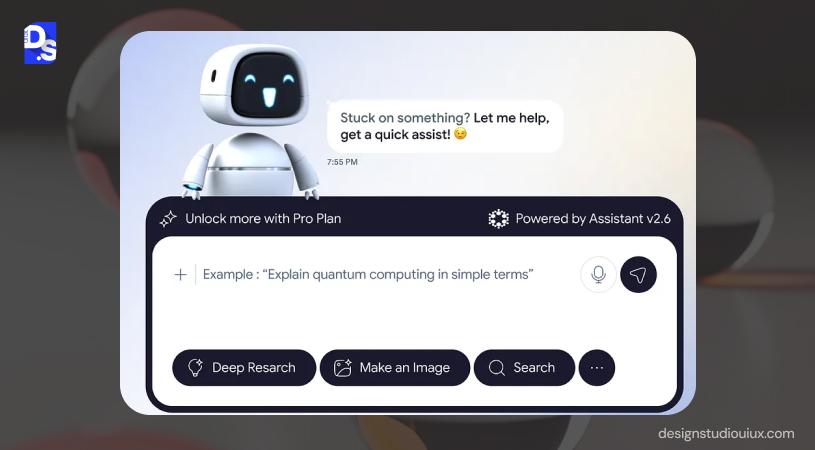
Chatbots are now the primary conversation interface, 88% of users have conversed with them in their lifetime.
Rise of AI interfaces
AI interfaces are integral in SaaS, ecommerce websites, enterprise dashboards among others. Modern AI web design also focuses on creating interfaces that feel conversational, adaptive, and user-centric.
Users expect intelligent assistance that seems reliable and usable.
Shift from navigation to conversation
A chatbot prioritizes conversational intent over traditional interface to minimize friction and dependency.
User expectation changes
People prefer a chatbot that offers contextual and instantaneous responses, instead of clumsy answers.
Business benefits
A well-defined chatbot UX will respond faster, thus driving query resolution and user engagement rate.
Chatbot UX vs Traditional UI Design
| Traditional UI | Chatbot UX |
| Screen-based layouts | Conversation-based interactions |
| Navigation hierarchy | Intent-driven hierarchy |
| Static interface states | Adaptive interaction states |
| Click paths | Invisible dialogue paths |
Intent hierarchy
In traditional UI, hierarchy follows a page-based path, people navigate to menus and tabs, find the right buttons, and interpret the right path.
Chatbot UX understands the intent, removes ambiguity, converts language to actions, and guides people toward the next step.
Context memory
Chatbot UX needs to memorize previous inputs, user preferences, task state, and session history to ensure the conversation feels natural and human-like.
Dynamic UI behavior
Unlike traditional UI, chatbots react in real-time through intent recognition systems, state management, dialogue branching, and failure handling.
Core Principles of Great Chatbot UI UX
40% of US adults use ChatGPT regularly. But do you know why? It follows these basic principles:
Clarity Over Cleverness
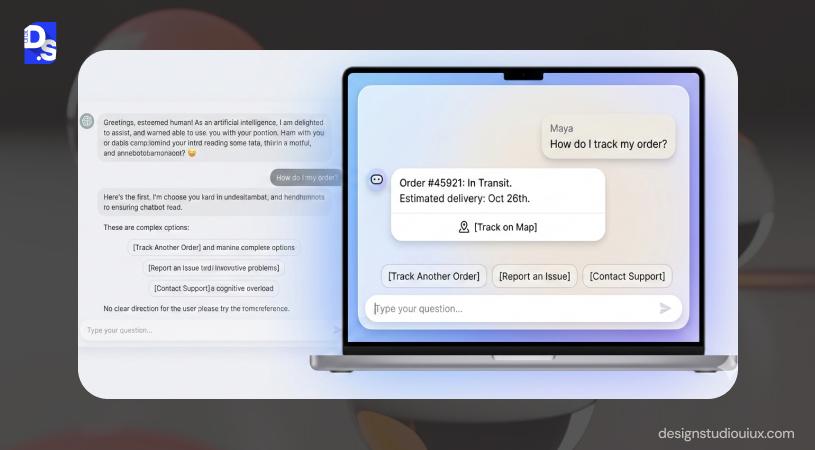
Chatbot design best practices prioritizes context, clarity, and honesty over personality. Enterprise users will not like sarcasm, similarly, eCommerce consumers would not prefer an overly serious tone.
Minimize Cognitive Load
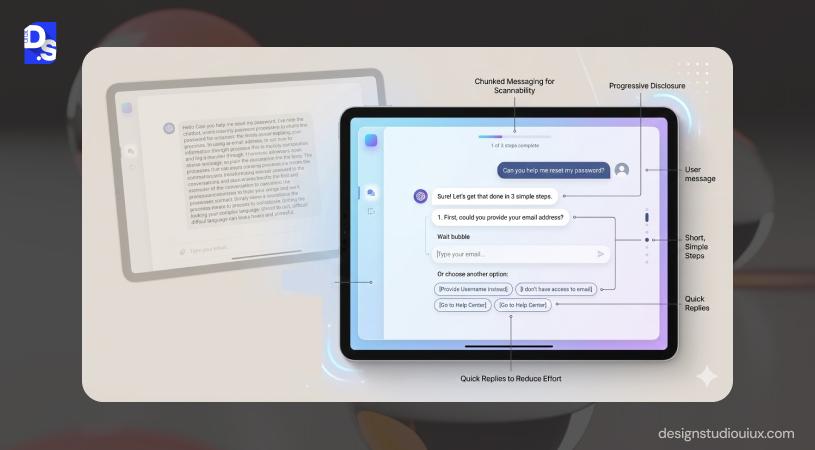
Users will promptly abandon a chatbot UI upon receiving large walls of text. They will exhaust themselves to understand the conversation, which signals friction. This cognitive load can be reduced through short responses and chunked messages.
Natural Conversation Flow
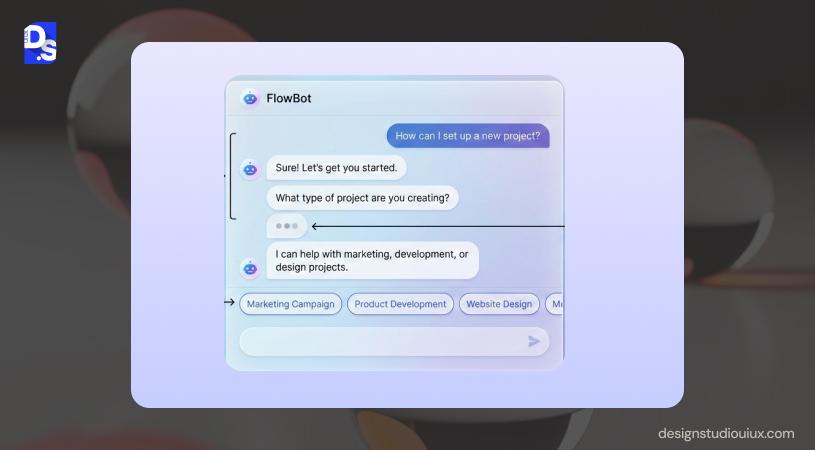
- Human-like pacing
Chatbots must include simple loading indicators to mimic phatic expression and the speed of human typing. The chatbot UX should have typing indicators (static and hover) to display the status.
- Progressive disclosure
Progressive disclosure slowly reveals the information to establish a natural conversational tone. This method helps people to fathom the meaning gradually, instead of being bombarded with large text blocks.
Context Awareness
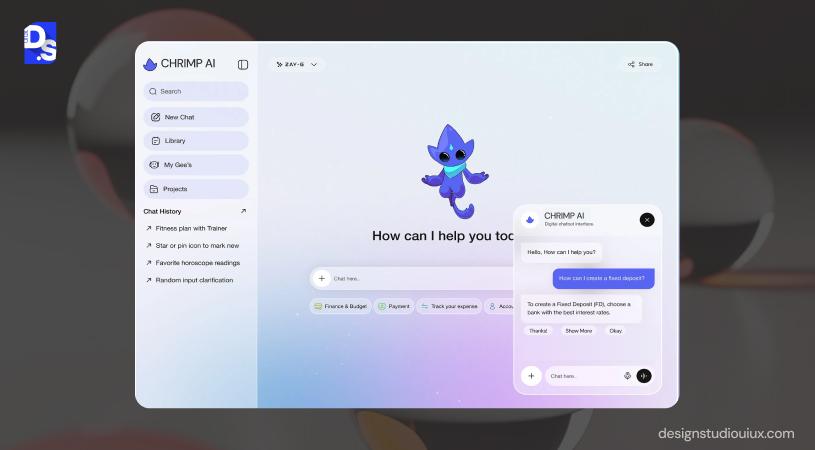
- Remember user inputs
Context is central to human conversations, and chatbots should have an advanced level of understanding. It should remember the previous chats, and provide answers relevant to user query.
- Smart suggestions
Based on user input and the bot’s purpose, the chatbot’s UX should provide relevant answers. A financial bot should not ignore the user’s past conversations about their goals, and a career bot should consider the user’s preferences.
Personality With Purpose
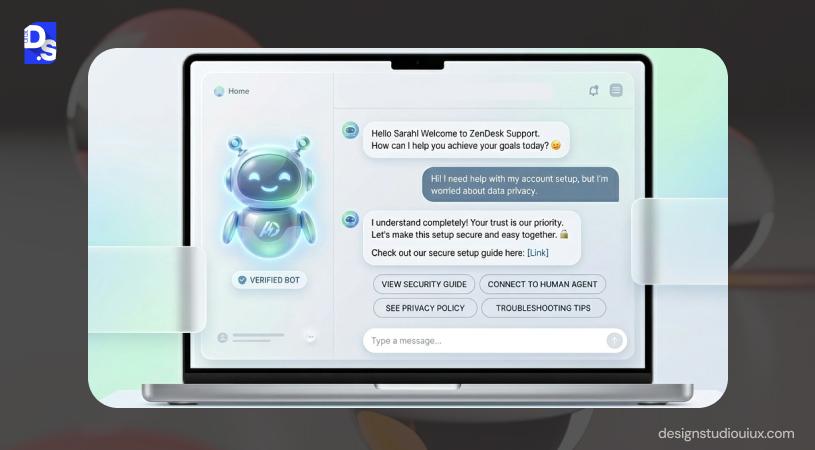
Depending on the brand’s personality, you can select a tone for your chatbot:
- Professional
- Funny
- Empathetic
- Friendly
- Sarcastic
Feedback & Error Recovery
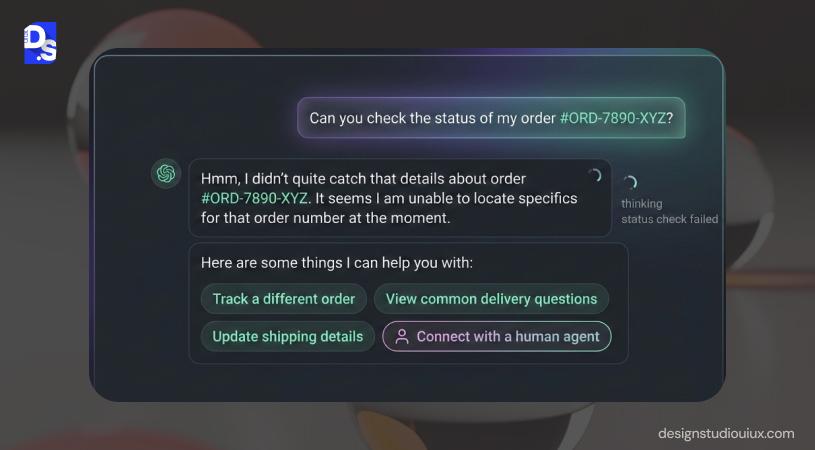
In chatbot UX design, feedback and error messages are necessary to handle unrecognized user inputs. The fallback response might sound like, “I am unable to understand your query. Here is the list of things I can assist you with” followed by separate buttons or tabs. If users are still unsatisfied the bot must run an efficient handover and recovery process (i.e., connecting with a human agent).
Chatbot UI UX Best Practices
- Guide users towards goal completion
- Reduce typing to mimic human pace
- Offer choices that feels relevant
- Provide exits when the bot cannot understand input
- Maintain context
- Enable human handoff/ fallback
Chatbot UX Design Process
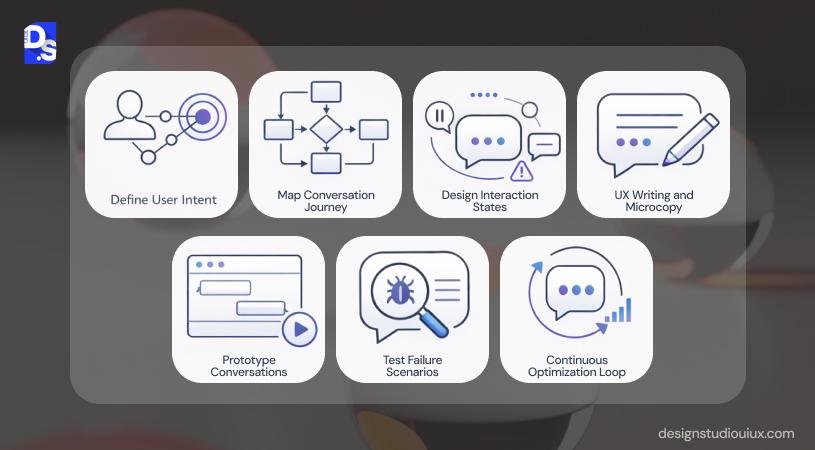
Chatbot UX design must balance utility and creativity to offer a smooth user experience. These are steps that needs to be followed:
Step 1 — Define User Intent
User intent mapping includes understanding the necessities and the challenges of the target audience, and providing solutions that require minimal user effort. The user intent will define the chatbot’s purpose.
Step 2 — Map Conversation Journeys
Chatbot conversations should imitate human communication, from the point of entry, to the completion stage. The conversation flow should prevent interactions, reduce cognitive load, and keep them conversation-focused.
The Information Architecture also includes decision trees with multi-step processes, eligibility checks, customer support routing, and conditional logic interactions.
Step 3 — Design Interaction States
These design interface states assist users to understand the chatbot’s activity, and establish a trustworthy relationship.
- Idle
This is the state that happens before the first interaction or if the conversation is paused. The goal is to set expectations, guide users, and reduce hesitation through clear welcome messages, accurate prompts, proper visual cues, and proper screens.
- Thinking
Chatbot is processing the request, and users should not proceed until the previous prompt is completed. This is indicated by typing indicators (3-dots), smart microcopy, realistic delays, and timeout-based fallback.
- Response
In this stage, the chatbot will deliver the desired information through short messages, chunked responses, quick-reply options, and clear CTAs.
- Failure
Chatbots cannot understand or complete a request, and must recover gracefully. This is achieved through escalation support (while maintaining a calm tone).
Step 4 — UX Writing & Microcopy
UX writing best practices asks chatbot designers to embed emotional intelligence into the interface.
- Tone
The tone of conversation flow should be contextual, transparent, and aligned with the brand’s core messaging.
- Clarity
Humans can understand simple messages, so chatbot interaction design prioritizes clarity, instead of complex jargon.
- Action prompts
Chatbot microcopy should include predefined options and avoid dead ends to reduce people’s typing efforts.
Step 5 — Prototype Conversations
Figma/ Sketch/ Adobe XD is used to prototype dialogue branches, such as intent branches, clarification loops, error recovery paths, contextual memory behavior, and timing. Conversation flows are handled using Whimsical, Miro, and Lucidchart, and Botpress is used to train these bots. You can check how the conversation works and analyze wireframe vs prototype vs mockup differences using tools like Google Analytics, or Mixpanel.
Step 6 — Test Failure Scenarios
Test failure scenarios paint the bigger picture on how the system behaves during ambiguous inputs, incomplete data, intent misunderstanding, emotional escalation, dead ends, and unsupported requests.
Usability testing methods can test the chatbot’s response in these scenarios:
- Ambiguous input (Does the system ask clarifying questions?)
- Incomplete data (Does the chatbot detect missing inputs?)
- Intent misclassification (Can the bot learn from mistakes?)
Step 7 — Continuous Optimization Loop
Continuous optimization loop is an iterative approach used to improve a chatbot’s user experience by drawing from inferences.
It involves measuring UX performance metrics (task success rate, drop-offs, intent accuracy, etc.), friction, microcopy design, and re-testing until the desired quality is achieved.
Essential Chatbot UI Components
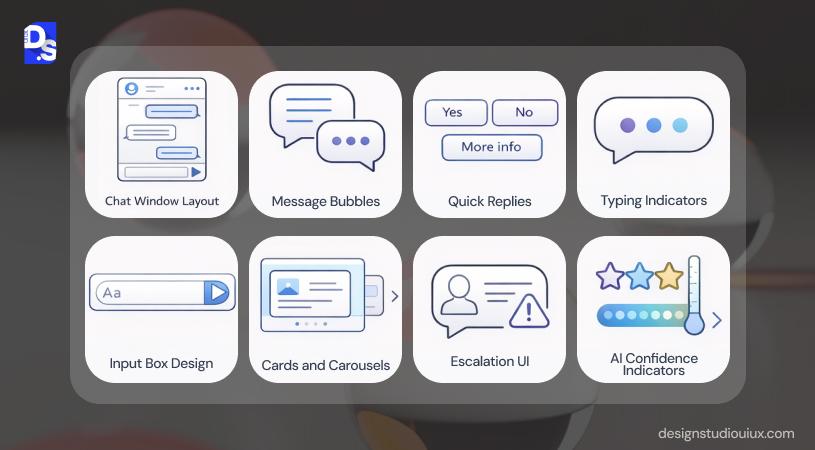
Chatbot UI elements play a critical role in making the interface usable and understandable. Here are some of those essential elements:
Chat window layout
Chatbot interface design begins with window layout, and it has a vertical design pattern. This layout follows Fitt’s law, which means it should be thumb-accessible (for mobile devices), and be adaptive across devices.
Message bubbles
UX designers apply spatial alignment and color contrast to differentiate between the human and bot’s response. This gives a familiar pattern, one you would see in iMessage (neutral for bot and blue color for user). The way these messages pop is one of the best micro-interactions examples.
Quick replies
Quick replies are pre-defined choices used to reduce friction and create a smooth user experience. These replies allow users to choose the most efficient path among the choices, based on the user’s intent.
Typing indicators
Typing indicators allow users to understand if the bot is busy (perceived wait time). These indicators tell people that the bot is thinking (imitating human behavior).
Input box design
The input box acts as a placeholder text, helping people to figure out what to type next. Usually, it supports multi-line text and a visible Send icon.
Cards & carousels
Cards and carousels are used to handle large blocks of text (high-density information) through an image, title, and call-to-action buttons. Carousels help with horizontal swiping, predominantly used across mobile devices.
Escalation UI
Escalation UI is the “emergency exit”, and occurs when the bot’s confidence score is low.
Contrary to popular belief, “Talk to a Human” does not indicate failure. It means the UX is prioritizing the user’s valuable time.
AI confidence indicators
AI confidence indicators are subtle UI elements that tell the user how certain the bot is about its answer.
Confidence indicators can vary from a “Verified” badge flashed against the answers, or a small disclaimer to recheck generative responses.
Chatbot UX Patterns That Improve Engagement
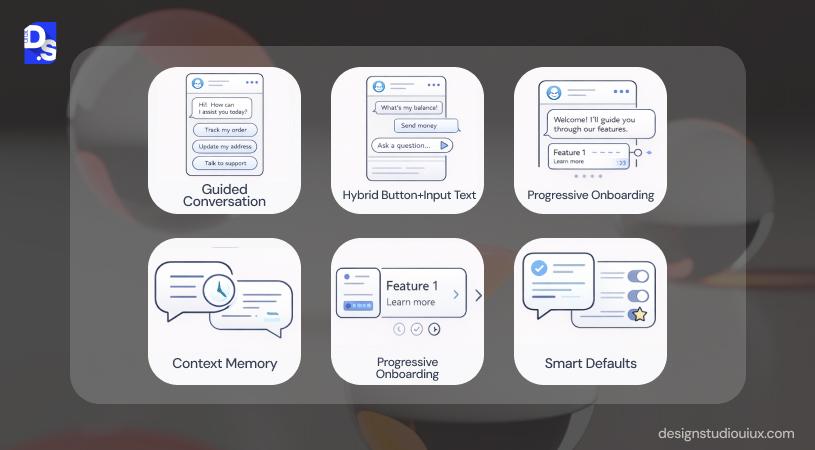
Chatbot UX patterns guide users toward completing tasks by reducing typing effort, maintaining context, and providing clear conversational paths.
Guided conversation
Guided conversations are prompts, suggested paths, and clarifying questions, all used to lead users toward completing a task (login, signup, or booking an appointment).
Hybrid button + text input
Chatbot UX uses hybrid conversational patterns that combine quick reply and open text fields. Buttons can be used to maintain flexibility, and open text fields reduce error rates. User behavior dictates:
- New users prefer buttons
- Returning users might prefer typing
- Others will choose an option from suggestions
Progressive onboarding
Progressive onboarding helps users to discover the interface without getting overwhelmed, by giving information about the next relevant step.
Context memory
Contextual memory helps the chatbot UI to provide responses based on previous inputs. This helps people to maintain conversational continuity without asking repetitive questions.
Smart defaults
Smart defaults are UX design patterns embedded within chatbot UX based on user behavior, location, and previous inputs.
Real Chatbot UI UX Examples
Chatbots are dominating every niche, from retail to hospitality. However, we have picked 4 examples of efficient chatbots for your understanding:
Customer support bots
Amazon’s chatbot helps users with orders, refunds, or delivery issues, through “Track order”, “Return or replace items”, and “Problem with delivery”. Users are offered common intents immediately, reducing typing effort. This reduces friction and increases resolution speed, especially for high-volume support tasks.
SaaS onboarding assistants
HubBot from HubSpot presents a clean design and intuitive interface, helping users with booking appointments, asking for support, or managing complex sales processes. Its SaaS onboarding UX uses different color tones (for user and the bot) to maintain brand consistency.
Ecommerce assistants
Ecommerce assistants can be used to answer people’s queries without involving human agents. Domino’s chatbot is a prime example of such assistants. The chatbot contains carousel elements that enable horizontal scrolling of the food menu. Following ecommerce UX best practices, their bot offers quick-replies to guide customers toward completing a purchase.
AI copilots
Notion AI helps users summarize content, rewrite text, brainstorm ideas, and generate structured outputs directly inside documents.
The AI appears within the workspace, and understands the document content before generating suggestions. Its tutorial follows mobile app onboarding best practices, starting with simple steps and gradually pushing them toward complex activities using progressive cues.
Common Chatbot UX Mistakes
A well-functioning chatbot is characterized by UX clarity. However, these UX design mistakes can affect its performance, leading to trust erosion, and drop-offs.
Long welcome messages
If chatbots send long walls of text, without chunking them, it causes friction and cognitive load, and early drop-offs.
Solution
- Chatbot copy needs to be short, 2-3 lines max
- Emphasize 3-4 action-based prompts
- Progressive disclosure
Fake human tone
Sometimes, chatbots overcompensate for the robotic tone, and become extra playful or deceptive. The playful tone might work in the ecommerce sector to some extent, but it can hurt conversion in B2B SaaS, fintech, or healthcare.
Solution
- Establish a clear and helpful tone
- The brand’s tone and context should be matched
Dead-end conversations
When the chatbot says “I don’t understand” and abruptly ends the conversation, it might lead users to abandon the entire chat or restart, both of which are not good signs.
Solution:
- Chatbot UX should allow users to move toward the next step
- Offers suggestions and related queries
- Must offer escalation options
No fallback paths
If a chatbot repeats “Try again” every time it fails, it will lose new and repeat customers. To correct this, chatbots should have other fallback responses, such as “Talk To A Person”, “Here Are Possible Solutions”, or “Other”.
Too many options
Sometimes, designers add too many options to the interface to provide all of the information. This can confuse and overwhelm users, prompting them to immediately leave the platform.
Over-automation
Automation is not the answer for every situation; there should be a balance. It should not be used for high-risk, complex, or emotional scenarios. Sometimes, human backup can go a long way to gain the user’s trust.
Chatbot UX for AI & LLM Products
AI and LLM products don’t have the same characteristics of a basic bot, and the UX is quite different too:
GPT-style interfaces
GPT-style interfaces champion a clean layout, message bubbles, continuous scroll, and single input field. The LLM interface helps users to focus on the conversation and its continuity.
Transparency UX
Users must be aware that they are talking to a bot and what are the limitations, otherwise, they cannot trust AI. Transparency is one of the factors that designers should emphasize while using AI in UX design.
Trust signals
AI chatbots must have these trust signals (source citations, confidence indicators, data badges) to display reliability and safety.
AI hallucination handling
Sometimes, LLMs might provide fabricated information. Chatbot UI UX should have some guard rails to protect users against that through:
- Encourage users to cross-check critical information
- Provide citations whenever necessary
- Support user corrections
Explainable responses
Explainable UX tells users about the underlying logic or structure behind responses, adding more authority to the interface.
Chatbot UX Metrics That Matter
A well-designed chatbot will have high scores for all these UX performance metrics:
Task success rate
Task success rate calculates the effectiveness of chatbot UX (how many people can complete tasks without requiring human escalation).
Drop-off rate
Drop-off rate indicates how many users are abandoning the conversation before reaching the completion point. It is one of the critical user engagement metrics used to determine chatbot performance.
Intent recognition accuracy
A chatbot with high Intent recognition accuracy can understand the underlying intent of a user’s prompts and provide appropriate responses.
Resolution time
Resolution time measures how fast a chatbot can resolve a user’s request or query. An inefficient chatbot will take longer, leading to unnecessary handoffs and low satisfaction scores.
CSAT
Customer satisfaction score directly measures user sentiment through post-conversation surveys or ratings. A good chatbot UX will score 85% or higher, and will receive minimum escalations.
When Businesses Should Invest in Chatbot UX Design
Businesses across different niches are opting for chatbot design services, but these take the top priority.
SaaS products
In SaaS, losing users, especially during onboarding, is a recurring problem. The underlying cause? A complicated dashboard with unnecessary friction. A SaaS website design agency takes this factor into account while designing an interface to complete tasks.
Enterprise tools
Enterprise UI UX design assists users master the tool through contextual guidance. This will significantly reduce the onboarding time and improve employee productivity.
Ecommerce support
Ecommerce web design focuses on creating platforms that can handle repetitive queries, such as order tracking, returns, and product discovery.
AI products
AI and LLM-based tools operate in open-ended environments, and users feel overwhelmed about the output. AI ML UX design adds structure and explainability to manage hallucination and misinformation.
How Design Studio UI/UX Designs Chatbot Experiences
Research-first approach
The chatbot UI UX design process begins with understanding user intent through comprehensive UX audit services. The team then uses the insights to map goals and edge-case scenarios.
UX flow design
Design Studio builds structured conversation architectures, such as intent mapping, decision trees, fallback pathways, and escalation logic for SaaS onboarding projects.
Testing cycles
During this phase, our designers evaluate intent recognition accuracy, completion rates, friction points and failure loops.
Iteration model
Chatbot systems are monitored for measurable performance indicators such as drop-offs, escalation frequency, and intent misclassification.
Future of Chatbot UI UX
Conversational interfaces are blending modalities to anticipate user needs through these options.
Multimodal UX
Multimodal UX supports text, voice, visuals, touch, and gesture into a single conversational system.
Voice + Chat Fusion
Voice interfaces are not a superior alternative to text-based chatting, it’s merely an extension. Voice + chat fusion allows seamless switching between typing and speaking within the same experience.
Proactive AI Assistants
Instead of passively waiting for input, future assistants will become proactive collaborators that anticipate needs.
- Suggesting next action during a workflow
- Reminding about uncompleted tasks
- Offering insights before being asked
- Summarizing relevant data contextually
Ambient Interfaces
Ambient interfaces are quite common nowadays, you can find them in cars, smart homes, wearables, AR/VR, and IoT systems.
Conclusion
A well-designed chatbot UI UX manages intent, context, and errors, and guides users toward a goal. Traditional interfaces urge users to search, scan, and click, while conversational UX drives contextual conversations. At Design Studio UI UX, we treat it as a product system, through research-led flows, measurable UX improvements, and scalable architecture designing.
FAQs
What is chatbot UX design?

Chatbot UX design combines human psychology, AI, user experience, and microcopy writing to create intuitive, engaging, and human-centric interfaces.
What makes a good chatbot interface?
A good chatbot interface should be minimalistic, context-aware, and easy to navigate, and contain message bubbles, quick replies, typing indicators, and input fields. It should also have well-defined fallback options (bringing human support to resolve a complex human query).
How do you design chatbot conversations?
Chatbot conversation design involves these 4 steps: user research (mapping user journey), designing the conversation flows, testing and iterating the model until it achieves the desired efficiency.
What tools are used for chatbot UX?
Chatbot UX design involves Figma/ Sketch (for wireframing and prototyping), Miro or Whimsical for conversation mapping, and Google Analytics (for optimization and iterations).
What is the difference between chatbot UX & conversational UI?
Chatbot UX focuses on ensuring that the bot understands intent, responds, and guides users to complete tasks. Conversational UI prioritizes the visual elements (chat window, voice interface, and message bubbles) to ensure a smooth conversation between users and the bot.
Is chatbot UX different from app UX?
App UX follows traditional UI rules, and mainly focuses on menus, navigation, and buttons. Chatbot UX focuses on dialogue flows and context, rather than layouts and navigation paths.



