


SaaS Product Redesign: How to Decide Between Redesigning and Iterating


Quick Summary
Choose to redesign the product when it fails to match user tasks. If its main interface functions well, then you must focus on small updates. Most web applications we review only need targeted redesigns on two or three problematic flows, making a total system rebuild completely unnecessary.
Most SaaS redesigns start with a feeling. A competitor ships a slick new interface, someone drops the link in a team channel, and by Friday there’s a meeting about “refreshing the product.”
The feeling isn’t wrong. It’s just a weak reason to spend $80K and four months of your team’s time.
First, ask a specific question: does the product architecture match actual userflow? If yes, continue with small UI improvements. If not, small updates won’t save it.
What is a SaaS product redesign?
A SaaS product redesign is the process that changes how your app looks and works. It basically changes the layout and interface of an application when minor updates fail to fix deep-seated issues. It’s about the product your customers log into, not your marketing website. If the marketing site is what’s holding you back, our guide on signs it’s time to redesign your website is the better read. Here we’re talking about the app itself.
If the marketing site is what’s holding you back, our guide on signs it’s time to redesign your website is the better read. Here we’re talking about the app itself.
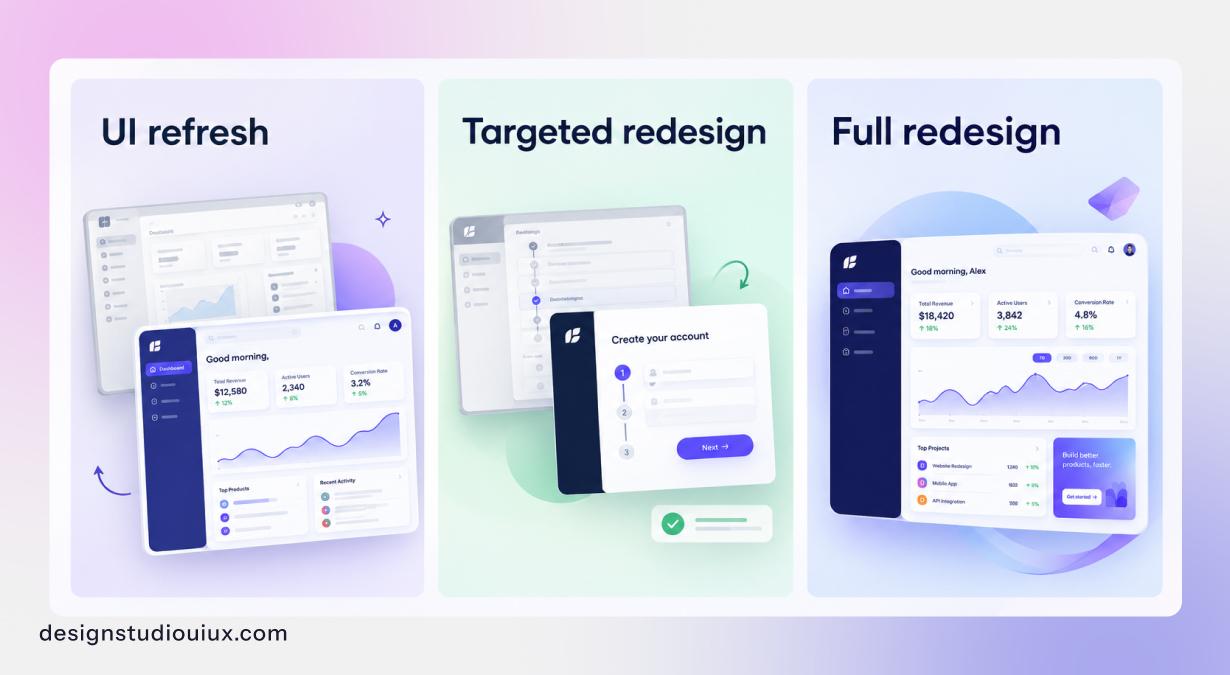
Redesigns come in three sizes, and a lot of money gets wasted when a team pays for one size and needed another.
| Size | What changes | What stays | Usual reason |
|---|---|---|---|
| UI refresh | Colors, type, spacing, icons, how components look | Navigation, flows, data | It works fine but looks dated or inconsistent |
| Targeted redesign | Two or three core flows, plus navigation in those areas | The rest of the product and the brand | A few flows lose people, like setup, onboarding or reporting |
| Full redesign | How the whole product is organized, most core flows, a new design system | What the product does and customer data | The structure no longer matches how customers work |
One more thing- Do not mix rebrand and redesign projects. Keeping them separate will allow your team to work the UX rather than debating over brand logos.
Should you redesign your SaaS product or keep iterating?
Keep iterating when the structure of your product is fine and there are issues in particular screens. Redesign when the structure is the main problem and you will see it in a few ways.
- Features have been added wherever there was room.
- The navigation doesn’t match how people actually work.
- Every fix causes a new problem somewhere else.
Jakob Nielsen’s 2009 article Fresh vs. Familiar: How Aggressively to Redesign still holds up. His advice is to change most products gradually, since a new design breaks the habits people depend on.
He makes two exceptions. One is when you barely have any users to upset. The other is when years of small additions have left the interface a tangle with no clear structure holding it together.
He also makes a point every product team should hear. You look at your own product for thousands of hours. Your customers spend a small slice of that, and they’re thinking about their task, not your layout. So the design starts to feel tired to your team long before customers notice anything. When someone says “it looks old,” that usually tells you how often your team stares at it, not what’s hurting users.
In our audits the answer is rarely all or nothing. It’s usually two or three flows that need real redesign work, with steady improvement everywhere else.
How do you score whether your SaaS product needs a redesign?
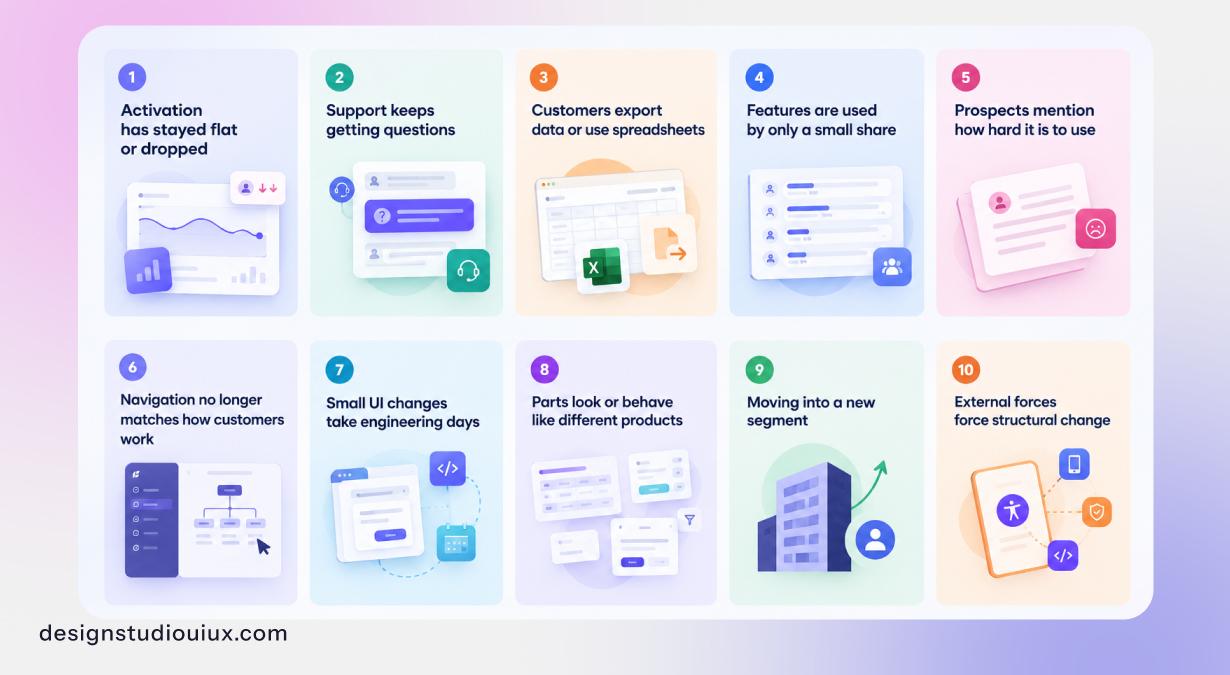
Score 0, 1, or 2 points to each of the statements- below a 0 if it’s not true, 1 if it’s partly true, or 2 if it’s clearly true, then add them up. If the results sum up to 0-6, it means you should keep iterating, 7-12 points means targeted redesign work, and 13-20 signifies a full redesign.
We use a version of this on discovery calls. It isn’t science. What it does is move the conversation away from taste and toward things you can actually check.
| # | Statement | Where to check |
|---|---|---|
| 1 | Activation has stayed flat or dropped over the last two or more releases | Product analytics |
| 2 | Support keeps getting questions about how to do basic, core tasks | Helpdesk tags, top ticket topics |
| 3 | Customers export data or use spreadsheets to finish work the product should handle | Export logs, customer calls |
| 4 | Features you shipped in the last year are used by only a small share of accounts | Feature usage reports |
| 5 | Prospects, champions or lost-deal notes mention how hard the product is to use | CRM notes, win/loss reviews |
| 6 | The navigation no longer matches how customers group their work | Tree tests, card sorts, session recordings |
| 7 | Small interface changes take engineering days because screens were built differently | Sprint history, estimates |
| 8 | Parts of the product look or behave like different products | A quick inventory of tables, filters, forms and modals |
| 9 | You’re moving into a segment the current experience wasn’t built for, like enterprise | Sales plan, roadmap |
| 10 | Something outside forces structural change: accessibility, mobile, or a front-end rebuild | Legal, procurement, engineering roadmap |
What your score means
- 0 – 6: For this score range, keep iterating. Make design changes to fix problems in the particular screens, test those changes, then tidy up components that do not match. A full redesign would cost more than it returns.
- 7 – 12: This is the most common score range and generally designers look for targeted redesign work. Here, the solution is to identify problems and then make design strategies accordingly.
- 13 – 20: A full redesign makes sense, so start with a UX audit so the work is based on what you find.
One catch: If you could not answer the first four statements because you don’t track activation or feature use, set that up first. If you do not have a starting point, you can not show that the redesign worked.
What are the signs a SaaS product needs a redesign?
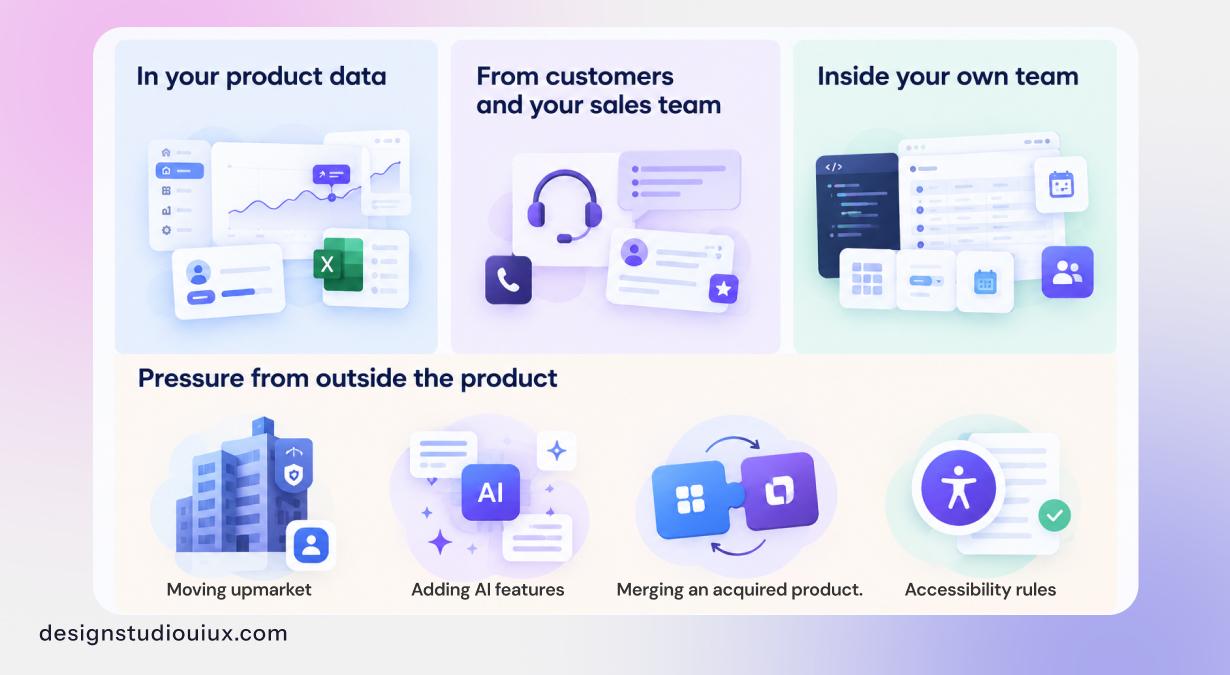
You know it is time to redesign your software when user engagement falls and your sales team struggles to close deals against modern competitors. Internal warning signs include growing customer complaints and development teams taking too long to ship basic updates.
In your product data
Start with activation. If it’s flat even though you keep shipping, the product is getting heavier without getting easier. Then look for drop-off that keeps happening at the same step in setup, release after release. Our SaaS onboarding UX guide shows what a good first run looks like.
New features that hardly anyone touches are another tell. Usually people either can’t find them or can’t see where they fit. And watch for spreadsheets. When customers export data just so they can read it properly, your product has quietly lost part of its job, which is one of the slow causes of churn we cover in how UX reduces SaaS churn.
From customers and your sales team
Support answers the same “where do I find” questions every week. Customer success runs hour-long training calls for things that should take five minutes. In competitive deals, buyers tell your reps your product does more but the other one is easier to use. That last one stings, because you’re losing on something you could fix.
Inside your own team
Engineers often notice first. A small interface change takes days because every screen was built a bit differently. You may have three versions of the same table or date picker, and nobody knows which is right. Here the fix is a shared set of components and our enterprise design system guide shows you how.
Pressure from outside the product
- Moving upmarket. Bigger customers expect roles, permissions, audit logs and admin controls. Squeezing those into a product built for small teams usually breaks the navigation.
- Adding AI features. Assistants and suggestions need a proper home in the layout. In older products they often end up as a floating widget nobody clicks.
- Merging an acquired product. Two products with different patterns behind one login confuse everyone until they’re brought together.
- Accessibility rules. The European Accessibility Act has applied since 28 June 2025 to digital products and services sold to consumers in the EU (AccessibleEU, European Commission). Plenty of B2B tools fall outside its direct scope, but there are clients who ask for accessibility documentation during procurement anyway. Fixing accessibility problems for every screen (in an inconsistent product) is usually slower than building it into a new set of components.
When is a SaaS redesign the wrong call?
A redesign won’t help if the main problem is not related to the interface of the product. Take a look at these situations where we’d tell a client to hold off-
- You haven’t found product-market fit. Redesigning an unproven product just polishes a guess. Talk to users first.
- Trials don’t convert because buyers can’t tell who it’s for.
- People never sign up at all. That’s your marketing site, not the app.
- Your numbers are healthy and the push is mostly about looks. A light refresh, or nothing, is fine.
- Engineering can’t build it within a quarter. Designs that sit in a backlog for months get built without the thinking behind them.
- You don’t have enough users to learn from. A week of customer calls will teach you more.
How much does a SaaS product redesign cost in 2026?
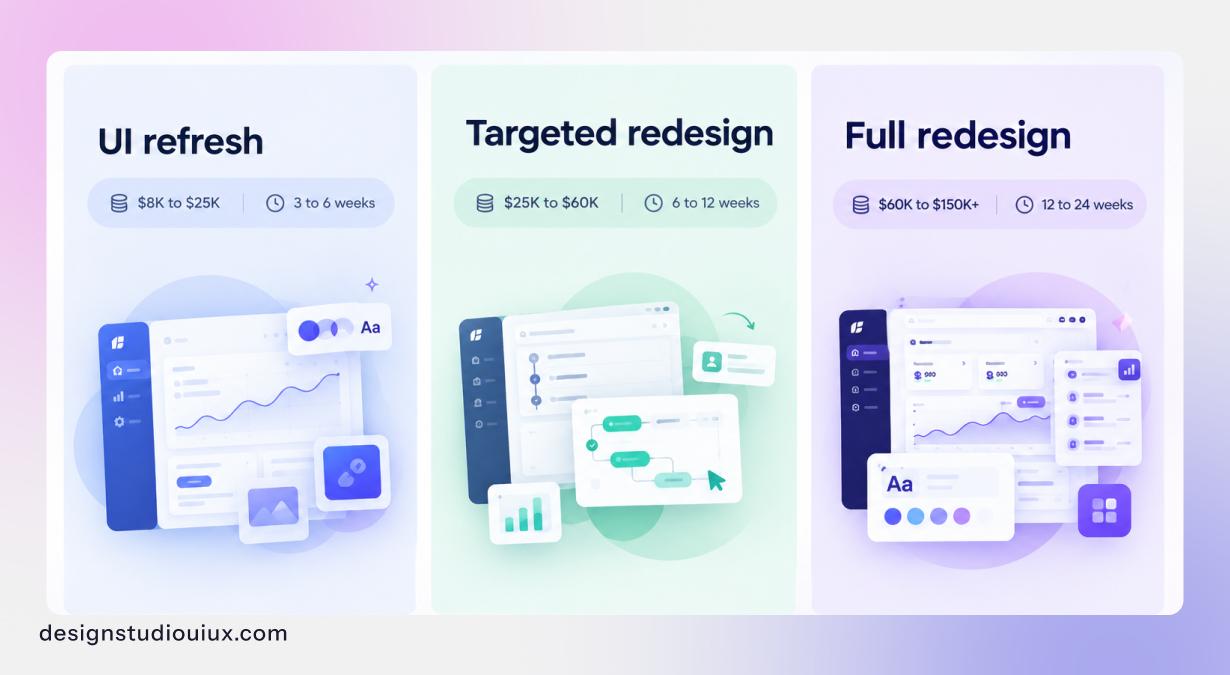
Across the market, teams pay around $8K – $25K for a UI refresh and $25K- 60K for a targeted redesign of a few core flows. A full product redesign with a new design system runs $60K- 150K or more. The scope of design work sets the price, not company size. More roles and screens cost more.
| Size | Typical cost | Design time | What you usually get |
|---|---|---|---|
| UI refresh | $8K to $25K | 3 to 6 weeks | New visual style, restyled components, key screens updated, style guide |
| Targeted redesign | $25K to $60K | 6 to 12 weeks | Audit, research, new flows for 2 or 3 areas, prototypes, user testing, components for those areas |
| Full redesign | $60K to $150K+ | 12 to 24 weeks | New structure across the product, all core flows, design system, testing rounds, rollout plan |
These are design costs, research and testing included. Front-end development is extra. Location matters too, with US and Western European studios usually at the top of each range. We don’t work from a fixed price list. We scope each project first, and the audit usually decides which band it falls into.
To see how budgets shift by funding stage, read our SaaS UX design cost guide. If you’d rather start small, the UX audit cost guide covers that first step.
What pushes the price up
Mostly complexity. Every user role (admin, manager, member, guest) adds screens and states to design and test. Tables, dashboards and reports take longer than forms and settings. If there’s no design system yet, building one is real work, though it pays for itself on every screen after. Old front-end limits force designers to work around what engineering can’t change. And every extra approver adds another round of reviews.
Before you sign off on any number, do a quick sum. What does one quarter of churn cost you right now? If the flow you want to fix causes even part of that, a targeted redesign tends to look cheap.
How long does a SaaS product redesign take?
Design time for a targeted redesign of core flows is about 6 – 12 weeks. A full product redesign takes 12 to 24 weeks. Development and rollout often add another quarter, and this overlaps with the final design stages. Testing with users along the way helps avoid delays.
Here’s roughly how a targeted redesign splits up.
| Stage | Time | What happens |
|---|---|---|
| Audit and research | 2 to 3 weeks | Analytics, session recordings, support tickets, user interviews |
| Structure and flows | 1 to 2 weeks | Navigation, user flows, wireframes |
| Screens and components | 2 to 4 weeks | Final screens and the components they need |
| Testing and changes | 1 to 2 weeks | Tests with new and experienced users, then revisions |
| Rollout in stages | 2 to 6 weeks | Beta groups, staged releases, measuring (runs alongside development) |
How do you redesign a SaaS product without losing users?
Go in stages. Leave the daily actions where users expect them. Test with new and long-time users. Let customers switch back for a while, until the new version proves itself.
Here is the order we follow.
1. Measure your product’s current performance
Record current performance related numbers before design work starts, i.e. note down activation, completion rates for core tasks, time on task, support tickets by area, and feature use. If you skip this, you won’t know whether the redesign worked, and may not have data for next budget review.
2. Pick one number per flow
“Better UX” isn’t a goal. “Setup completion from 40% to 60% within 90 days” is. One number per flow keeps everyone honest and shows you where to start.
3. List everyone the change touches
In B2B, that’s more people than you’d think: end users, admins, the buyer who signed the contract, and your own support team. A change that helps end users can quietly break an admin’s setup routine. Our guide to B2B SaaS UX design for buyers, users and admins covers each role.
4. Leave daily habits alone at first
Look at what your regular users do every day and do not move the features. Think main buttons, keyboard shortcuts, saved views, export formats, and bookmarked URLs. Change everything else first.
5. Test with experts and newcomers separately
They run into different problems. New users get lost in the structure, while experienced users get slowed down when familiar features features move. If you test only one group, you’ll miss half the issues.
6. Agree on components before screens
For anything bigger than a refresh, settle the component set first. It keeps the redesigned areas consistent. Your feature teams can also keep shipping with the same parts while the redesign is still going.
7. Release in waves
Sequence your release across small user groups over time. Start with staff and beta accounts, give users an option to revert temporarily, and track who switches back.
8. Tell people before they see it
No one likes logging in to find everything moved. Announce the change and explain why. Update help articles and screenshots. Brief support and sales. Add a short note inside the app for the first few sessions.
9. Decide your rollback rule before launch
Write down which number would make you undo the change, and how long you’ll wait before you decide. That talk goes much better before launch than in the middle of a support spike.
What do B2B SaaS teams need to plan for that self-serve products don’t?
B2B redesigns affect more than daily users. They also affect people who seldom log in and documents you haven’t seen. Plan for admins, customer training material, contracts, and renewal dates.
Admins set the product up for everyone else. Change settings, permissions or user management and the effect spreads across the whole customer organization, so test admin flows as carefully as the everyday ones.
Your customers have also documented your old interface. Inside their companies there are SOPs, training decks and screen recordings showing where everything used to be. For larger accounts we usually suggest 30 to 60 days’ notice, plus updated screenshots they can drop into their own material.
A few last checks before launch:
- Contracts. Review contract agreements before moving or removing features as they explain workflow, tools, accessibility standards, etc.
- Renewals. Don’t move a big account to the new interface right before its renewal date. Introducing new interface friction near contract renewals can lead to increase in churn rate. Check contract details for further clarification.
- Integrations.Updating page markup affects customer extensions, web widgets, and automated UI scripts. Give client technical teams early access so that they can adjust custom integrations.
If your product serves large organizations, our enterprise UI/UX design team plans for all of this for smooth project execution.
How do you know if the redesign worked?
Compare your old performance data against your post-launch metrics as the redesign works when the target metric improves and change lasts.
Check the results on a routine basis, i.e. every 30, 60, and 90 days against your pre-redesign baseline to get an idea of the improvement.
Expect a dip first. Give users time to learn the new interface before drawing conclusions.
Track task completion rates, time spent on –
- three most common tasks,
- support tickets about the redesigned area,
- feature use, and
- churn.
Compare accounts using the new version with those still using the old one, where possible. If satisfaction scores improve but user behavior stays the same, the redesign may have changed the look without fixing the main problem. See our guide to UX performance metrics for the full list.
How Design Studio UI/UX approaches a SaaS product redesign
Every redesign project we take on starts with a live product audit. We agree on explicit lists detailing which user flows to overhaul and which to leave alone.
Our work with SmartMoving shows what fixing structure looks like in practice. Their customers were juggling leads, scheduling and invoicing across disconnected tools. We interviewed more than 30 end users, from dispatchers to drivers, and used card sorting to group over 50 day-to-day tasks into three hubs: Lead Management, Job Execution and Analytics. More than seven older screens for creating jobs and logging inventory became single views.
After launch we handed over a component library, so that new modules could be added without breaking the existing workflows that people rely on.
If your product audit lands in the middle range, consult our SaaS product design team or schedule a free call to identify your highest-priority flows.
Summarize this article with AI
FAQs
How do I know if my SaaS product needs a redesign?

Your SaaS product needs a redesign if its primary performance metrics decline or users struggle to navigate the site or complete their tasks. Monitor user behavior rather than visual aesthetics to learn about the main structural failures.
What is the difference between a UI refresh and a SaaS product redesign?
A UI refresh changes surface visuals and it involves colors, type, spacing and the style of components. Navigation and flows stay the same. On the other hand, a product redesign changes how the product is organized, including navigation and the steps inside core tasks.
Should we redesign the whole SaaS product at once or in phases?
To redesign an active SaaS product, update it in gradual phases rather than all at once. Start by fixing the user flow with the highest drop-off rate or support ticket volume, then test it with a small user group. Next, measure the results before moving to the next section.
Should we redesign before rebuilding our front end?
Yes, finalize the UX structure, core user flows, and component system before starting the front-end rebuild. If you rebuild the old interface in a new framework and redesign later, you may have to redo much of that work during the redesign which will cost you more.
Can we keep shipping features during a SaaS redesign?
Yes, as long as new features use the new components and nobody makes big changes to the areas being redesigned. A shared design system is what makes this work, because feature teams and the redesign team build from the same parts.



