



Ecommerce Navigation UX Best Practices with Examples



from our Complete Ecommerce UX Guide

Quick Summary
Ecommerce navigation best practices involve using strategic whitespace, simple and logical menu structures, and clear product labels to help users quickly find what they are looking for.
Effective E-commerce navigation is critical for an online store’s success. If users can find, or naturally discover products on your E-commerce site with ease – you will sell more:
Recent case studies have shown that when you design a website that converts with intuitive site navigation can boost monthly conversion rates by at least 18.5%
Baymard’s 2024 Product Finding study (conducted over 5,550+ hours and 219 qualitative usability test sessions) mentioned poor navigation and category structure are the primary contributors for product abandonment on ecommerce sites, among the 1000+ medium and severe UX issues.
This is further corroborated by Baymard’s UX Awards 2024, which states only 1% of ecommerce websites have the best UX navigation that drives conversion.
Website visitors spend up to 6.44 seconds staring at the main navigation menu
According to the eye-tracking study from Nielsen Norman Group, people focus more on the navigation menus than the page content.
Also, 80% of the time they look at the left navigation menu, compared to the right navigation area (20%), which tracks with the F-pattern.
This means in ecommerce, the side navigation menu’s design quality is the decisive factor between first impression and bounce rates.
In comparison, they only spend about 5.59 seconds reading the site’s written content
This disparity shows just how critical navigation is for an eCommerce site’s success.
Users do not want to see complex, hidden menus with indecipherable icons.
They want a well-designed navigation menu where products are logically categorized and the most popular categories are listed on top.
We are going to explore all the major E-commerce navigation best practices you need to know to create such a well-designed, user-centric navigation system for your eCommerce site.
We’ll also share some relevant UX strategies, and practical Ecommerce navigation examples that you can directly apply to your site’s design.
Ecommerce Navigation Best Practices at a Glance
| Navigation Practice | Key Implementation | Primary Benefit | Reference Example |
| Simple & Logical Structure | Max 8 top-level categories, clear labels | Reduces confusion, improves discovery | Amazon |
| Prioritized Product Categories | Broad main types → specific subcategories | Easier product discovery, better SEO | The Container Store |
| Search Bar with Filters | Price, brand, size, color, predictive text | Faster product find, higher conversion | Zalando |
| Sticky Navigation | CSS position:sticky, top:0 fixed menu | Lower bounce rate, higher engagement | Walmart |
| Mobile-Responsive Navigation | Bootstrap/Flexbox, hamburger menu, tab bars | Captures 44.6% of US mobile sales | Best Practice |
| Visual Hierarchy & Clear CTAs | Size, color, spacing hierarchy; CTA contrast | Guides users toward purchase actions | Best Practice |
| Breadcrumb Navigation | Home > Category > Subcategory > Product trail | Better orientation, lower bounce rate | Crate & Barrel |
What Are The Best Ecommerce Navigation Practices ?
The seven ecommerce navigation best practices of 2026 include:
1. A clear navigation structure with fewer than 8 top-level menu items
2. Logical product categories, with “Most popular” section listed on top
3. A lightning-fast search bar with advanced filters (price, brand, size, and color)
4. A sticky menu for constant accessibility while scrolling
5. Mobile-responsive layouts, with thumb-friendly and intuitive hamburger menus
6. Breadcrumb navigation highlighting the site hierarchy
7. Visual orientation and placement of CTAs to nudge users toward conversion.
According to Baymard Institute’s 2024 Product Finding Study, these practices address key UX failures that drive cart abandonment measured across 1,000 usability issues.
Good navigation is beneficial for both shoppers and eCommerce websites. Let’s analyze the most important Ecommerce navigation best practices you need to follow to give your store good navigation:
Simple, Clear, and Logical Navigation Structure
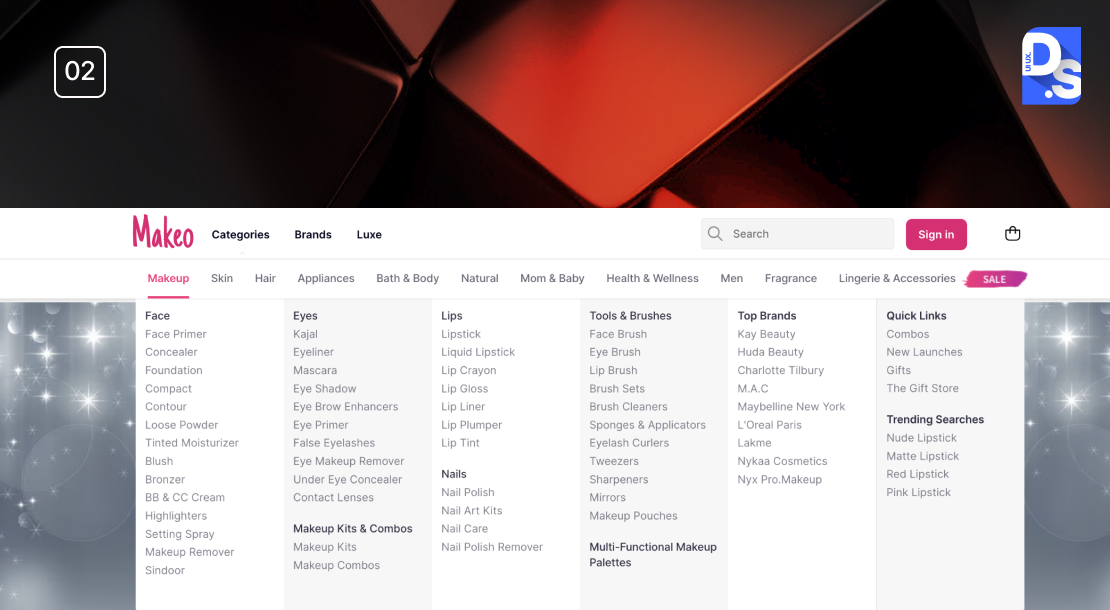
eCommerce navigation menu can be structured through: a navigation menu with 8 top-level product categories, jargon-free product labels, category and subcategory prioritization (expandable on click), strategic whitespace to prevent misclicks, and the most-visited categories assigned a high/ top priority.
Amazon is the perfect example of this, and that’s why it received Baymard’s 2024 On-Site Search top 1% UX award.
Why It’s Important
- A logical structure helps users navigate without confusion
- It intuitively guides them to their desired products
- When customers can find what they need quickly, they’re more likely to stay and shop
- This simplicity also makes them less likely to abandon their shopping journey due to confusion or frustration
- A cluttered or confusing navigation system will deter customers from returning
Applying This eCommerce Navigation Best Practice to Your Store
Limit Main Menu Items
- Keep the number of primary categories to no more than 8
- Only include essential categories that reflect your main product offerings on the main menu
Use Clear Labels
- Choose short, descriptive labels for each category
- Avoid jargon
- Only use terms that your customers will understand at a glance
Organize with Subcategories
- Break down larger categories into relevant subcategories
- Use font size, color, and spacing to emphasize primary categories and their subcategories
Use Whitespace
- Ensure there is enough space between navigation items to prevent misclicks
- Use the right fonts and font sizes to make the category/subcategory names easier to scan
Major categories like “Electronics” easily expand into more specific subcategories with just a click.
Prioritize Product Categories
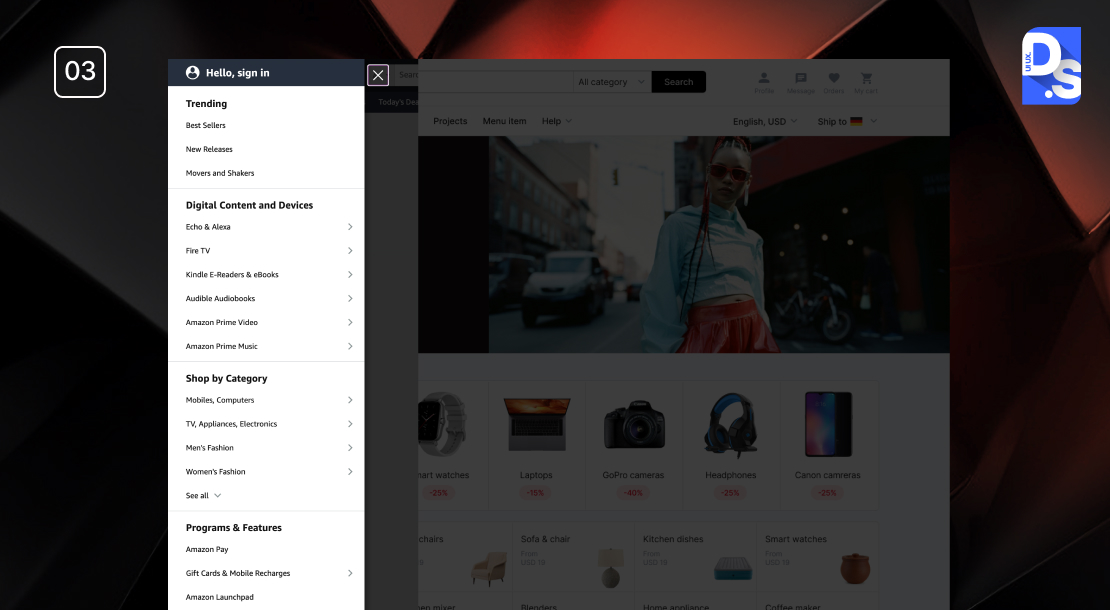
- This best practice involves creating a hierarchy of products and product pages and then grouping them logically
- Main categories should represent broad product types
- Subcategories should detail specific items within those broader product types
Why It’s Important
- Creating logical product categories simplifies navigation
- It helps customers easily and intuitively locate their desired products within the menu
- Clear categorization also aids in inventory management
- It also improves search engine optimization (SEO) by making it easier for search engines to index product pages
- These effects combine to make products more discoverable and increase the likelihood of sales
Applying This eCommerce Navigation Best Practice to Your Store
- Identify broad product types that reflect your offerings and create main categories accordingly
- Break down each main category into specific subcategories
- Use descriptive labels; make all category names clear, intuitive, and jargon-free
- Monitor search queries and browsing patterns to refine your categories based on what your target customers are searching
- Keep category names and structures uniform across the site for a predictable UX
- Review and revise your category names and structures based on inventory changes and user feedback
Prioritizing product categories is like one of those universal Ecommerce UX best practices that will only have positive effects.
One site that gets product categorization spot on is The Container Store. This website features 10 main categories, each with multiple relevant subcategories. The subcategories only appear when users click on the main categories.
Implement a Search Bar with Filters
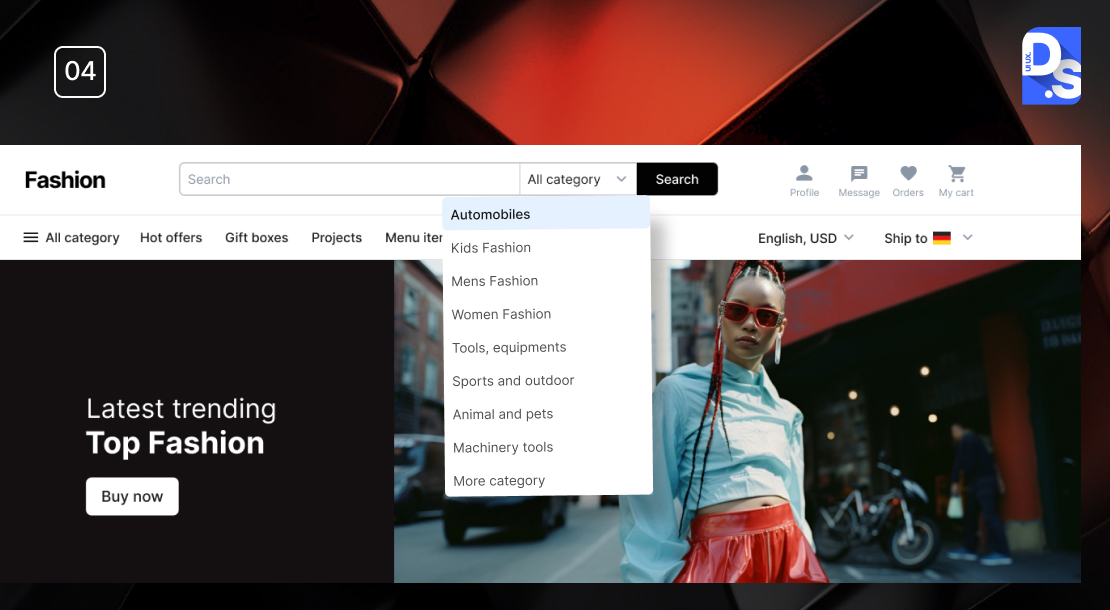
- A well-designed search bar, complemented by advanced filters will allow users to quickly locate products
- Filters allow shoppers to narrow down search results based on specific product attributes such as price, brand, size, color
- This functionality can transform a basic search bar into an all-powerful tool for product discovery
Why It’s Important
- Integrating a search bar with filters allows customers to find exactly what they’re looking for without sifting through irrelevant products
- This streamlined search UX saves customers time, increases their satisfaction, and ultimately results in higher conversion rates
- Effective filtering can also enhance product discoverability and make shoppers ‘stumble upon’ items they have previously not seen
Applying This eCommerce Navigation Best Practice to Your Store
- Position the search bar at the top of your website for instant visibility
- Allow users to refine results by key attributes like price range, size, color, brand
- Display a manageable number of filters initially, with options to expand for more choices
- Implement predictive text suggestions as users type to reduce input errors
- Analyze search data to identify common queries and optimize your filters accordingly
- Filters should reflect current inventory and buying trends; remove filters that shoppers rarely use
Zalando has an awesome search bar with advanced filters that allow users to filter products by size, color, and brand. It makes their product catalog more findable and discoverable.
Implement Sticky Navigation
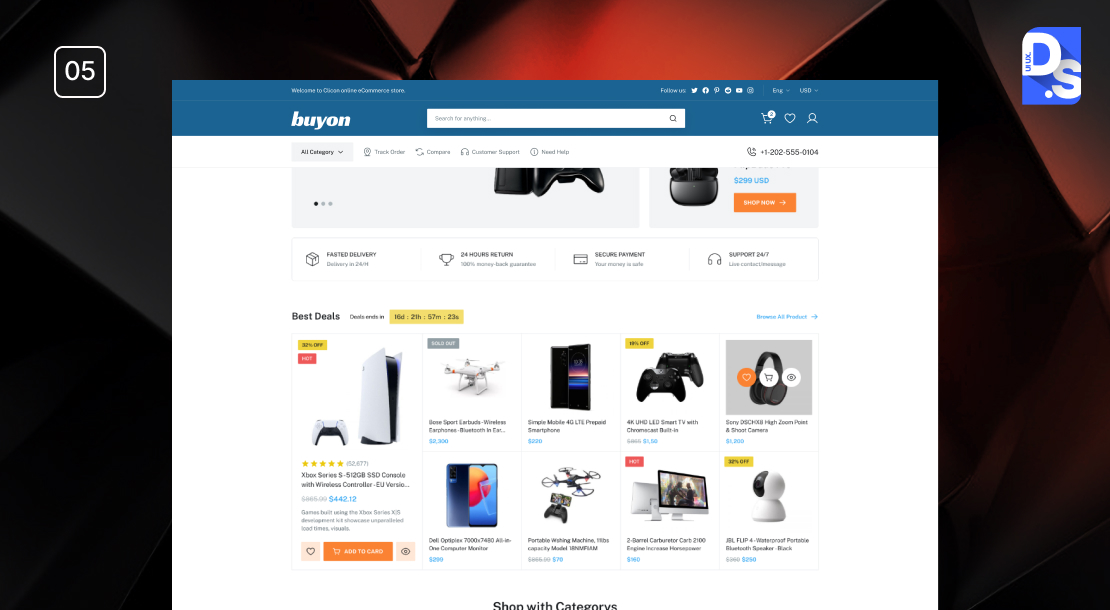
Sticky navigation is a fixed header menu that remains accessible even when visitors scroll, using CSS property position: sticky with top:0. It reduces bounce rate by ensuring product discovery, preventing the need to scroll back up.
Without it, users would churn, especially if they are unable to find their desired pages or categories.
After auditing 400 sites against 500+ UX guidelines, Baymard chose Walmart’s navigation UX as the top contender for its UX Awards 2024 category.
The highest scoring UX factor is its sticky menu, which persistently provides access to key categories and promotions.
- Sticky navigation refers to a fixed menu that remains visible as users scroll down a page
- This design ensures that essential navigation elements are always accessible
- It allows users to navigate without having to scroll back to the top
- Sticky menus can be placed at the top-left or right of the screen
Why It’s Important
- Sticky navigation enhances UX by giving users constant access to key menu items
- With it, users can jump between sections without losing their place on the page
- Having a persistent menu can lower bounce rates, improve navigation speed, and increase conversions by keeping users ever-engaged with content
- Users may become annoyed and bounce if they have to scroll back up repeatedly to access the menu
Applying This eCommerce Navigation Best Practice to Your Store
- Identify which key elements (e.g., logo, main product categories) should remain visible in the sticky menu.
- Use CSS properties like position: sticky and top: 0 to keep the menu fixed during scrolling
- Test across devices to ensure that the sticky navigation works seamlessly on desktop and phone
- Design the sticky menu with contrasting colors to make it stand out against the page content
- Keep the number of items in the sticky menu limited to avoid clutter
- Use analytics tools to track how users engage with the sticky menu and make revisions based on their behavior
Walmart uses sticky navigation with a top menu always visible as users scroll. It gives customers access to various departments and promotions without friction or interruption.
Since Walmart popularized it, sticky navigation has been one of the more popular eCommerce design trends.
What is Ecommerce Navigation and Why It Matters?
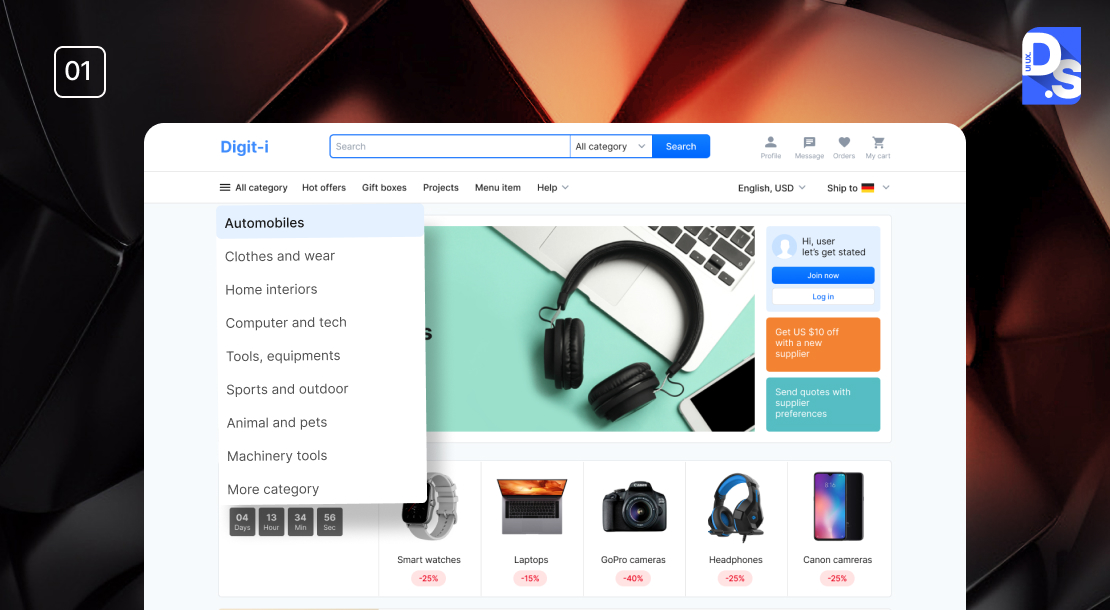
Ecommerce navigation consists of menus, categories, search tools, links, and pathways, guides users through an online store and an optimized user experience.
From a conversion perspective it matters, because it minimizes bounce rate, enables product discovery and SEO indexation, encouraging customers to revisit.
On the other hand, poor navigation is a primary factor of low ecommerce conversion rate, 1.65% to 1.89%, according to Smart Insights’ 2024 benchmarks.
The above data means that 2 in every 100 visitors are likely to complete an action, however, it might vary as per industry, device, and navigation quality.
Websites that support intuitive structure will outperform, indicating how UX navigation impacts decision-making.
There are two ways to look at eCommerce navigation – from the shopper’s perspective and the designer’s (your) perspective:
The Shopper’s Perspective
From the shopper’s perspective, navigation refers to all the design elements – menus, tags, buttons, links, etc., that help them explore the online store
Checking out different tags on the menu, clicking links that take them to specific categories, looking up things on the search bar – these are all part of the Ecommerce navigation UX
A well-designed navigation system delivers good user experiences.
The site’s navigation system should make it easy for visitors to explore the store and find exactly the items they are looking for, regardless of how ‘complex’ the site is
The Designer’s Perspective
- From the designer’s POV, Ecommerce navigation refers to the system of menus, categories, search functionalities, links, pathways, and other elements that guide users through the store
- The better they design their navigation system, the better the UX
- Good UX means users will be able to explore the site seamlessly, find products, and complete purchases with ease
From both perspectives, a well-designed Ecommerce navigation system is critical to an online store’s success:
- Facilitating Product Discovery
Effective navigation is crucial for facilitating product discovery and helping easily locate the products they are interested in
- Facilitating Conversion
When users can navigate a site effortlessly, they’re more likely to engage with products and ultimately ‘convert;’ conversely, poor navigation always leads to high bounce rates
- Brand Boost
Users are less likely to feel lost, overwhelmed, or frustrated when navigating an eCommerce site with a logical structure and accessible info – great for inspiring return visits
- SEO Boost
A well-designed navigation system will give the site a clear structure which will directly help search engines index the site effectively and give it higher visibility in search results
How To Improve Ecommerce Navigation UX For Higher Conversions ?
Ecommerce navigation UX can be improved through a mobile-first responsive layout (as 44.6% of US ecommerce traffic comes from mobile), maintaining the website’s visual clarity through size, color, and spacing, positioning CTAs strategically to prevent scrolling, and implementing a breadcrumb navigation to support three or more category levels.
It can be further optimized using browsing behavior data from Google analytics.
Over 2 billion people have visited online stores in 2024, but the conversion rate is a meager 1.88% (as of May 2024).
Want a conversion rate that is higher than this small figure?
Then, your eCommerce site needs to do more than just remove all obstacles between shoppers and the products they seek.
It also needs to have a navigation UX design optimized for conversion. Here are some eCommerce navigation UX strategies that you need to apply to give your store an edge:
Mobile Responsive Navigation
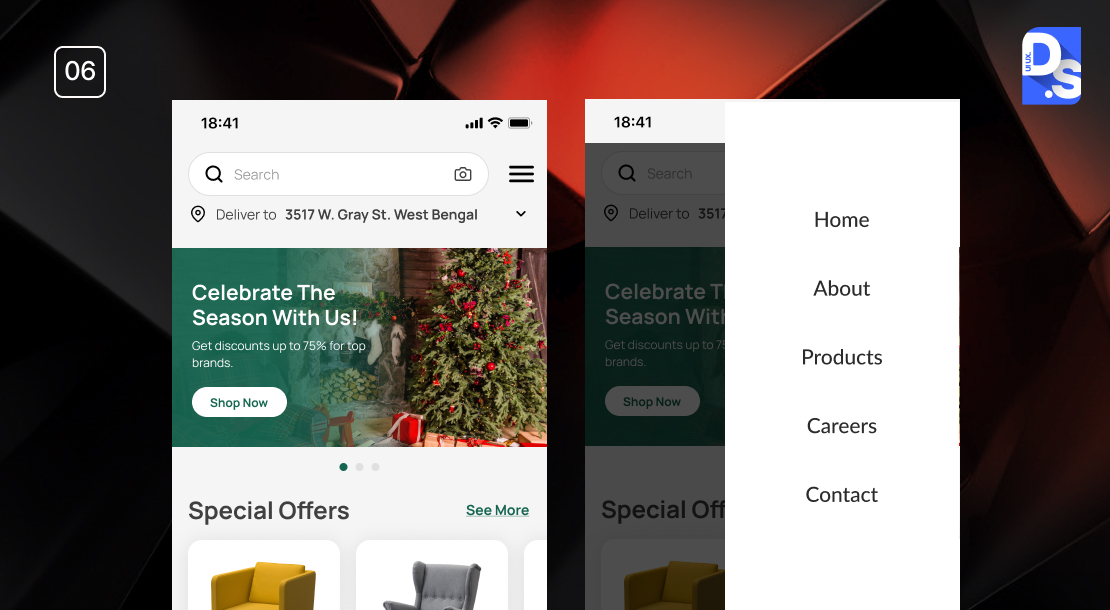
Mobile commerce is expected to reach $3.35 trillion by 2028, so mobile-friendly ecommerce navigation is essential.
It can be achieved through CSS frameworks like Bootstrap or Flexbox (for fluid navigation), touch-friendly navigation (hamburger menus, tab bars, large buttons), adequate whitespace, proper positioning of search bar, menus, and key categories, and regular testing for performance maintenance.
Some additional facts to consider for mobile responsive navigation:
- So far in 2024, 44.6% of all retail eCommerce sales in the US have come from mobile
2024 Mobile Commerce Trends from Shopify stated that eCommerce sales in 2024 amounted to $558 billion. Also, on an average, people spend 3 hours 15 minutes on their phone per day, browsing different categories.
- The figures are similar worldwide as around 67% of all global eCommerce sales are set to happen on mobile devices this year
Oberlo states that almost 63% of global sales will happen via mobile in 2028, and the total revenue will surmount to $3.35 trillion.
- To tap into this market, your website’s navigation needs to be mobile-responsive and adapt seamlessly to different screen sizes
- This essential eCommerce navigation UX strategy involves using flexible layouts, touch-friendly buttons, and phone-friendly, intuitive navigation patterns like hamburger menus or tab bars
- It means you will prioritize the user experience (UX) quality of your store on smaller screens from the start
Why It’s Important
- It will help you cater your site to the ever-increasing number of mobile shoppers
- Google prioritizes mobile-friendly sites in search rankings
Applying This eCommerce Navigation UX Strategy to Your Store
- Use CSS frameworks like Bootstrap or Flexbox to create navigation layouts that adapt fluidly to various screen sizes
- Ensure all buttons, links, search functionalities, and other navigation elements are large enough for easy finger-tapping
- Maintain adequate spacing between elements to prevent misclicks on smaller screens
- Implement established UI patterns such as hamburger menus or tab bars that users recognize.
- Position essential navigation items – like the menu, search bar, and product categories – prominently on all pages
- Constantly test your store’s navigation across various devices to identify and rectify usability issues
Follow these steps to create an effective mobile-responsive navigation system that your store’s user experience and conversion potential.
Visual Hierarchy and Clear CTAs

- This E-commerce navigation UX strategy involves using size, color, typography, and spacing to emphasize important navigation and conversion-related information
- The goal of this strategy is to draw attention to the calls to action (CTAs) and purchase buttons on the site
Why It’s Important
- Establishing a clear visual hierarchy is vital for effective communication
- It helps users quickly identify essential information and intuitively seek out the most critical elements of the eCommerce site
Applying This eCommerce Navigation UX Strategy to Your Store
- Use analytics tools like Google Analytics to identify common paths users take
- Structure your navigation menu and categories based on this data
- Use top-level navigation for the most popular items, ensuring they are easily accessible without excessive scrolling
- Position high-demand categories prominently in your navigation menu
- Choose concise, descriptive labels for your navigation items that align with user expectations
- Use visual hierarchy principles -size, color, and spacing – to make important items stand out
- Ensure that dropdown menus are easy to scan by grouping related options inside the visual hierarchy logically
- Position all CTAs prominently in the layout so they are easily visible without scrolling
- Use larger fonts for headings and CTAs (larger and bolder than secondary items) like ‘Buy’ to draw attention
- Use contrasting colors for your CTA buttons and the site’s background
- Choose fonts that are easy to read and differentiate between headings, subheadings, and body text
- Organize content in a way that suits our natural scanning patterns (like F/Z-patterns)
A well-structured visual hierarchy makes all pages in an online store visually appealing and scannable. As visitors enjoy the visuals and scan the content, well-placed CTAs push them towards conversion.
Breadcrumb Navigation for Better Orientation
Breadcrumb navigation is a secondary pathway that tells users about the current location within the site hierarchy- “Home> Electronics> Shaving Machines > New Products”. eCommerce websites with more than 3 or more product hierarchy levels (especially those with detailed subcategory pages).
Baymard in its “Homepage and Category Navigation” research paper stated that 13% of top eCommerce websites don’t provide secondary category pages.
Breadcrumbs can mitigate that issue by creating pathways for users to backtrack without revisiting the main menu every time.
Why It’s Important
Baymard, after testing 12 major retailer sites, found that 33% of mobile ecommerce sites don’t follow the best practices, and fail to convert.
Here’s why you add breadcrumbs to your site:
- Breadcrumbs allow users to see their current position relative to other pages
- This makes it easier to navigate back to previous categories or the main homepage
- This is a feature particularly beneficial in ecommerce settings, where users often explore multiple product categories before making a purchase
- Effective breadcrumb navigation makes users feel more in control of their shopping journeys
- Without breadcrumbs, users must rely solely on the main navigation menu, which is overwhelming after navigating through multiple levels
Applying This eCommerce Navigation UX Strategy to Your Store
- Use hierarchy-based breadcrumbs that reflect the structure of your site
- Place breadcrumbs at the top of the page, just below the main navigation menu
- Ensure that breadcrumb labels are consistent with category names throughout the site
- Use arrows or other symbols (>) to separate breadcrumb links visually
- Avoid overly complex breadcrumb trails; limit the number of levels displayed to 3/4 for clarity
- Verify that breadcrumb navigation works effectively on all devices
Many navigation UX types can make your eCommerce site much easier to explore and enjoy. Breadcrumb navigation is definitely one of them.
What Are The Best Real-World Ecommerce Navigation UX Examples ?
The best real-world ecommerce navigation UX examples include: Crate & Barrel (for breadcrumb navigation and category filters), Nolah (for minimal 3-category menu with product imagery for fast visual selection), Nomad Goods (for visual-first navigation with robust instant search), Tiffany & Co. (for combined horizontal and dropdown sticky menu for constant link access), and Pants and Socks (for behavior-analysis-driven navigation with footer links and auto-complete search).
A great way to realize what E-commerce navigation best practices look like in real life is by studying the right examples.
Here are some of the most impressive eCommerce navigation examples we have seen that embody everything we’ve discussed so far:
- The site features a well-structured navigation menu with clear categories for furniture, decor, and kitchenware
- It has breadcrumb navigation so users can easily backtrack through categories
- It also offers comprehensive filters that allow users to sort by attributes like brand, price, material
- This popular online mattress store’s main navigation menu only consists of three categories -mattresses, bed frames, and bedding
- Each category includes images of top products, helping users visualize options quickly
- The store’s navigation UX is designed for quick identification and selection of popular products
- Consumer electronics and lifestyle products company Nomad’s online store has a navigation menu packed with visual elements
- These elements help users quickly identify product categories
- The store’s navigation UX design caters to visual learners
- There is also a robust search feature that helps users locate specific goods instantly
- Luxury brand Tiffany uses a combination of horizontal and dropdown menus
- This dual approach gives users constant access to important links
- There is also a sticky navigation bar that keeps all links visible as users scroll down the page
- This eCommerce site’s navigation is designed based on user behavior analysis
- It has footer navigation – important links are included in the footer as their users do not like cluttered menus
- It also has an amazing search functionality with auto-complete/correct features
Conclusion
We encourage all readers to adopt these best practices. Prioritizing mobile navigation is particularly crucial in 2026 as most of your consumers will shop on their phones. We suggest you start adding one of these popular mobile navigation patterns to your site right away:
- A horizontal bar at the top of the screen containing 5-7 links to main sections
- A vertical bar that provides an overview of sections and allows deeper nesting of sub-navigation items
- An expandable menu displaying multiple links and categories
- Dropdown Menus that reveal sub-navigation items upon interaction,
- A visually engaging grid layout that organizes content into cards
- A circular Floating Action Button (FAB) that provides quick access to primary actions or menus
Comment on how you plan to enhance your site’s navigation. If you want more personalized guidance on eCommerce navigation, our Full service UX design team at Design Studio UI/UX will be happy to help.
We also offer custom eCommerce website design services for businesses looking to elevate their mobile navigation and overall user experience.
FAQ’s About E-commerce Navigation UX Best Practices
What is ecommerce navigation?

Ecommerce navigation includes menus, categories, drop-down subcategories, search bars, filters, links, breadcrumb trails, sticky menus, and mobile navigation paths that let people look around an online store. According to research by the Baymard Institute in 2024, the user experience of navigation and finding products is the most important factor in how well an ecommerce site works.
How many navigation items should an ecommerce site have?
eCommerce navigation includes a main menu (which should not contain more than 8 top-level items). When a user clicks on a top-level category, the user should see their relevant subcategories. The research has been validated by many of the best-performing ecommerce websites that were reviewed by Baymard’s 2019 UX study.
Does navigation affect ecommerce SEO?
A well-structured navigation system creates a clear site hierarchy that search engines can efficiently crawl and index. Internal links within navigation menus pass link equity to category and product pages, improving their search visibility. Additionally, Google’s mobile-first indexing means that poor mobile navigation, which affects 44.6% of US ecommerce traffic, can directly suppress organic rankings. Breadcrumb navigation also generates rich result markup opportunities in Google’s SERP displays.
What is sticky navigation in ecommerce?
Sticky navigation is a fixed header menu that remains visible at the top of the screen as users scroll down the page, implemented using CSS position:sticky. It ensures users always have access to department links, the search bar, cart icon, and promotions without scrolling back to the top.
What are the best mobile navigation patterns for ecommerce in 2026?
The best mobile navigation patterns for ecommerce in 2026 are: (1) a hamburger menu for compact navigation; (2) a bottom tab bar for primary section access; (3) a horizontal scrolling category bar; (4) a full-screen expandable menu for deep hierarchies; and (5) a floating action button (FAB) for quick primary actions like search or cart.
What makes a search bar effective for ecommerce navigation?
An effective ecommerce search bar includes: (1) prominent placement at the top of every page; (2) predictive text suggestions that auto-complete as users type; (3) advanced filters for price, brand, size, color, and availability; (4) auto-correct for misspellings; and (5) analysis-driven filter optimization based on actual search queries.
How does breadcrumb navigation improve ecommerce UX?
Breadcrumb navigation improves ecommerce UX by showing users exactly where they are within the site hierarchy, for example, ‘Home > Furniture > Sofas > Sectionals’. This reduces disorientation in deep product hierarchies, lowers bounce rates for users who land on product pages from search engines, and improves the overall sense of control users feel while browsing.