


Webflow vs. WordPress CMS: Which One Should You Pick in 2026?


For years, the choice between Webflow vs WordPress was obvious – WordPress all the way. However, in recent years, Webflow has emerged as an equally popular powerhouse. Visual-first design. Exceptional speed. Hassle-free managed hosting. It offers all of that. You can build visually stunning and high-performance websites without any coding.
On the other hand, WordPress is still the #1 choice for content-heavy operations. It is still renowned for its legendary blogging tools. It offers limitless extensibility via its massive 60k+ plugin ecosystem. It also gives makers the ultimate control that comes with low-cost self-hosting.
Businesses today typically choose Webflow when they want design precision and streamlined workflows. They opt for WordPress when they need their sites to have blogging capabilities, a wide range of custom functionalities, and better budget control overall.
There is no universal ‘best.’ Only the best fit for your team’s skills and goals. So, which one is right for you? This guide will break down the Webflow vs WordPress debate, feature by feature. By the end, you’ll be able to make the right call.
Introduction: Why The Webflow vs WordPress Comparison Matters
Your site’s design, how you update its content, and how you add more site features as your business grows- your Content Management System (CMS) choice impacts all of these critical details.
Selecting the wrong platform can cost thousands in migration fees. It can cost you months of productivity.
When the choice is between Webflow vs WordPress for CMS, you actually have to select one out of two philosophies that oppose each other by nature.
Webflow is a visual, all-inclusive Software-as-a-Service (SaaS) platform. It packs up design, content management, and hosting- all in one platform. This approach is designed to eliminate the technical headaches of building a website. It will allow you to focus purely on design and content.
WordPress.org is the world’s most popular open-source, self-hosted platform. It is a free core software. You can install it on any web host. Its power comes from its infinite customizability, which it provides through a wide range of themes and over 60k plugins.
WordPress gives you total control. But it also gives you total technical responsibility for your site.
Webflow vs WordPress: Head-to-Head Feature Comparison
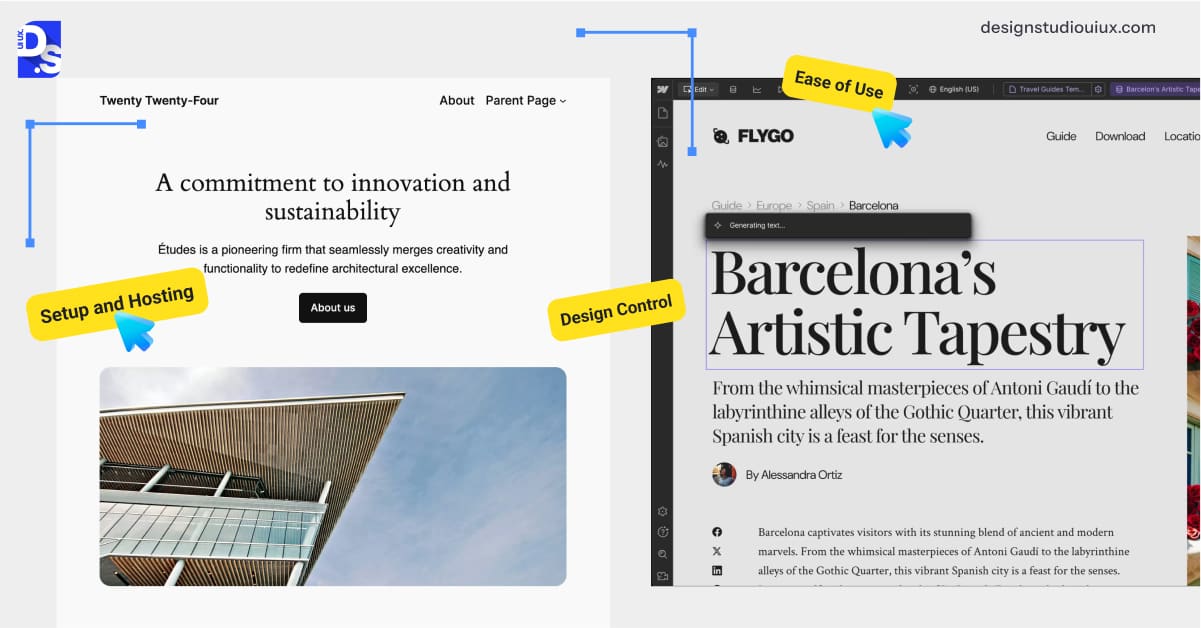
Let us break down the core features of these two Content Management Systems (CMS). We’ll see how they stack up in the real world in 2026.
Setup and Hosting
Webflow offers a completely all-in-one experience. When you sign up, you get access to:
- The design tool
- The CMS
- World-class hosting with a built-in SSL certificate
- AWS-powered CDN
There’s no need to find a hosting provider, configure servers, or worry about security patches. Webflow handles all the technical infrastructure for you. It’s ideal for teams lacking DevOps resources.
WordPress is free to download, but that’s just the starting point. You are responsible for:
- Finding and paying for your own hosting (~$5-$9/month)
- Registering a domain name
- Installing the software
You get total freedom to choose a hosting provider that fits your budget. But you are also responsible for the site’s setup, maintenance, and security.
Ease of Use
The Webflow vs WordPress for beginners debate highlights two very different user experiences.
Webflow features a powerful visual builder. This drag-and-drop builder feels very intuitive to web designers. Understand basic web design concepts like CSS properties? Then, you can easily create stunning, custom sites without writing any code.
However, for a true beginner, there is a steeper learning curve to master its full potential.
WordPress is famously easy to use for content editing. The Gutenberg block editor is a ready companion for those wishing to comfortably create and publish posts and pages. Once the site is complete, you can seamlessly manage content on a daily basis. The task is extremely straightforward. For this reason, bloggers and content teams love this platform.
The initial setup, however, can be quite complex. It requires the assistance of web developers. Maintenance can also get more complicated as the site packs more plugins and themes.
Design Control
When it comes to WordPress vs Webflow for web design, the approaches are night and day. Webflow gives you full control over your site’s HTML and CSS through a visual interface. You can:
- Manipulate every element
- Create complex animations
- Build pixel-perfect, responsive layouts
… without ever opening a code editor. It is a designer’s dream.
WordPress design is almost entirely dependent on your chosen theme and plugins:
- Tools like Elementor let you build pages by dragging and dropping, but they can make your site slower.
- If you want to change a WordPress design more than the theme lets you, you’ll need to code or get help from a developer.
To deliver fast, highly customized WordPress experiences, many businesses seek out custom WordPress website design services.
Blogging
In the WordPress vs Webflow for blogging debate, WordPress gets an easy win. It was originally built as a blogging platform, and it shows.
WordPress offers a robust system for everything content-related, including:
- Powerful tools for managing comments,
- Tags
- A variety of content categories
- Author archives
- Editorial workflows
- Scheduled posts
- Robust comment moderation tools
It is built for serious, content-heavy websites.
Webflow’s CMS is functional but basic. It can handle a standard blog. But its features for comments, tags, and categorization are limited compared to WordPress. It is more suited for portfolio-style content or simple company blogs where advanced content management isn’t a priority.
Plugins and Apps
This is another area where the two philosophies diverge:
- WordPress has a massive ecosystem of over 60k plugins.
- You can find a plugin for almost any feature imaginable.
- This makes WordPress sites incredibly extensible.
Webflow takes a different approach.
It has a much smaller number of 3rd-party integrations. It relies on powerful native features instead. It already has forms, sliders, and SEO built-in—no plugins needed. This creates a more stable and secure environment. However, it limits what extra features you can add to your website.
Ecommerce
Webflow has built-in eCommerce that’s simple to manage and ideal for smaller shops that want a nice-looking website. No technical expertise is needed to create small but stunning stores with Webflow.
Webflow’s eCommerce plans range up to about $212 per month.
WordPress powers eCommerce primarily through the WooCommerce plugin. This plugin is incredibly powerful and flexible. It can scale to handle massive stores with tens of thousands of products. You can set it up to work any way you need. It works well for large eCommerce businesses that want to customize things.
Performance and Code Quality
Webflow automatically generates clean, semantic code. This code is auto-optimized for fast loading times. It also offers website performance-boosting features like built-in CDNs and built-in image optimization. 90% Webflow sites score ≥90 on PageSpeed Insights.
WordPress performance is entirely dependent on your choices.
- Sites built with lightweight themes, high-quality plugins, and good hosting can be blazing-fast.
- Sites built with bloated themes and poorly coded plugins are slow.
Hence, achieving consistently fast performances with WordPress requires vigilant and manual maintenance.
Security and Backups
Webflow handles security for you. Because it is a managed, closed system, it includes:
- Enterprise-grade security
- DDoS protection
- Automatic backups by default
You do not have to worry about security plugins or patching vulnerabilities.
WordPress security is your responsibility. You need to:
- Use security plugins
- Keep your themes and plugins constantly updated
- Manage your own backups (or find a host that does it for you)
Support and Scalability
Webflow offers official customer support, along with a rich library of tutorials through Webflow University. This is a huge benefit if you run into trouble. The platform is highly scalable for most small businesses and eCommerce sites. But, you might need the assistance of a Webflow web design agency if you are creating a complex, high-end business site.
WordPress has no official support team. Instead, it relies on its massive global community. You can find the answer to almost any question in forums or tutorials. But you are on your own to solve the problem. In terms of scalability, WordPress is limitless. It can run anything from a personal blog to a massive enterprise application.
Who’s It Best For?
So, who should choose which platform? It comes down to your team’s skills and priorities.
Choose Webflow if you:
- Are a designer, a visual-first team, or a small agency.
- Want to move fast and avoid technical headaches.
- Prioritize visual precision over deep functionality.
- Are a designer/marketer wanting client-editable sites.
- Need strong collaboration tools.
- Invest in UX research services, and it reveals that your users want a visually stunning website.
Webflow’s editor allows marketers and other non-technical team members to easily update content on the live site without breaking the design.
Choose WordPress if you:
- Are a content creator or run a publication and need powerful tools for managing, categorizing, or scheduling content.
- Need maximum flexibility and extensibility.
- Want full control and prefer lower long-term costs.
- Run content-heavy sites (blogs, news, directories).
- Require specialized plugins (LMS, forums, CRM).
- Have technical resources for site setup and maintenance.
- Have access to high-quality responsive web design services.
WordPress gives you full control over your hosting environment. It gives you full control of your data. For high-traffic sites, self-hosting can also be cheaper than Webflow’s subscriptions.
Pros and Cons Snapshot
Webflow
● Pros
✅ Complete visual design freedom,
✅ Incredible out-of-the-box speed for all sites built with Webflow
✅ Clean code
✅ No hosting or security hassles
✅ Strong official support and learning resources
● Cons
❌ Higher monthly subscription costs ($14–$212/month -can escalate for advanced features)
❌ Smaller plugin ecosystem
❌ Migrating away from Webflow can be difficult (proprietary lock-in)
❌ CMS item caps hinder large-scale content projects
WordPress
● Pros
✅ Core software is free
✅ Massive plugin ecosystem
✅ Blogging tools and capabilities (categories, tags, editorial workflows)
✅ Self-hosting control enables cost optimization (as low as $5/month)
✅ Huge global community provides extensive troubleshooting resources and support
✅ Generally low-cost to start a project
● Cons
❌ Users bear full site maintenance responsibility
❌ Security, updates, and backups demand constant vigilance
❌ Plugin conflicts can cause frequent site crashes
❌ Website performance tuning requires technical skill
❌ Premium plugins/themes can drive up costs
❌ Without premium plugins/themes, the website’s design will suffer
Webflow vs WordPress Pricing Comparison
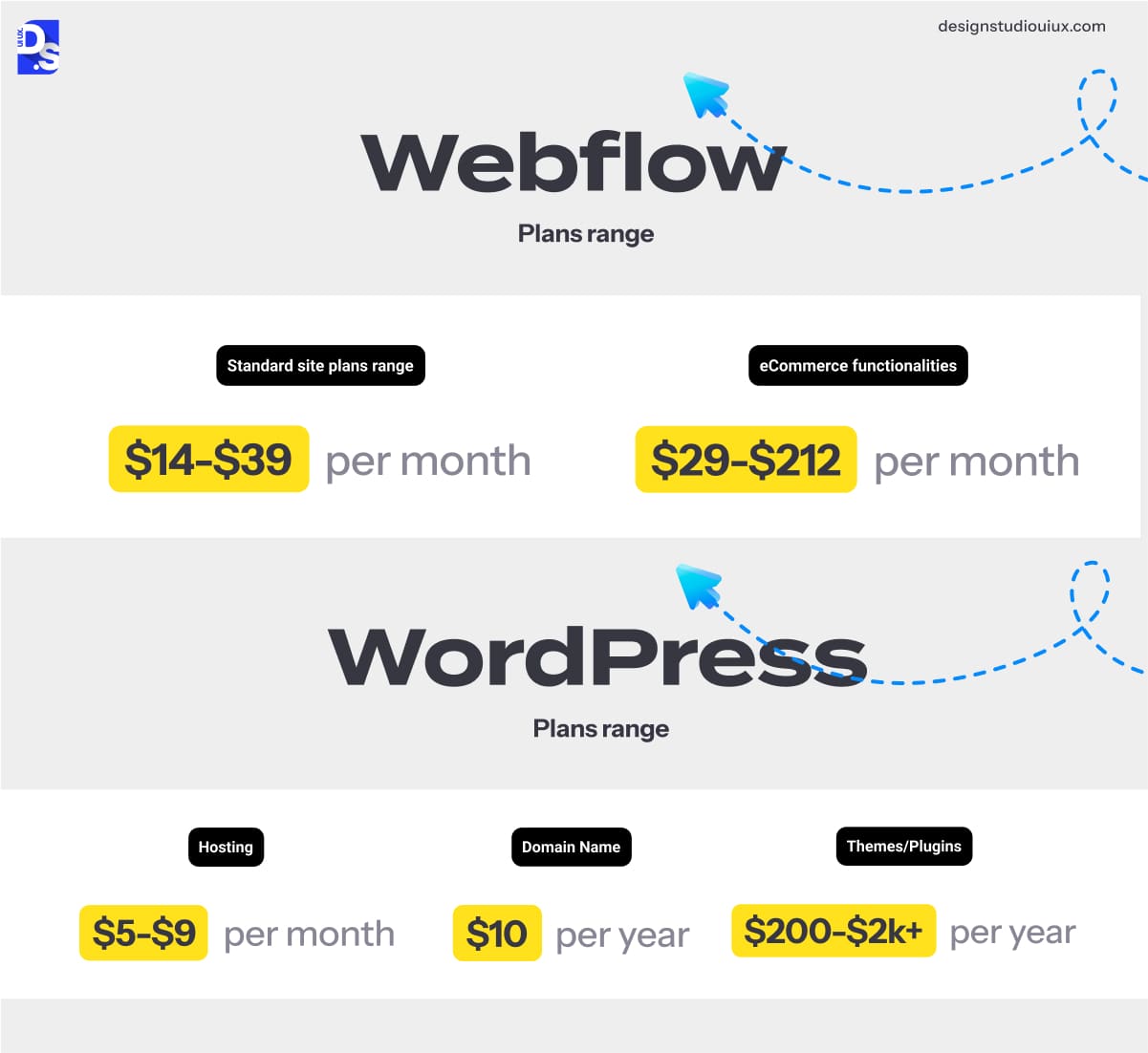
The Webflow vs WordPress pricing debate reveals fundamentally different models. Webflow operates on a subscription model.
Their standard site plans range from $14-$39 per month. If you need eCommerce functionalities, those plans range from $29-$212 per month. These fees cover everything – the software, hosting, security, and support.
WordPress software is free, but you have to pay for the other components. A basic setup includes:
- Hosting: $5-$9/month for a decent shared plan
- Domain Name: $10/year
- Themes/Plugins: Premium plugins will add $200-$2k+/year to the final cost
Developer fees for customization. Manual security fixes. Long-term manual maintenance expenses. When you add everything up, WordPress might cost as much or more than Webflow over time. To begin with a basic WordPress site, you might spend between $50 and $350 a year. With Webflow, you get a predictable monthly subscription. The verdict?
- Tight budgets: WordPress wins for barebones sites (blogs, portfolios).
- Design-centric projects: Webflow’s flat fee justifies faster builds and zero maintenance.
- Ecommerce: Webflow suits smaller stores; the WordPress and WooCommerce combo scales cheaper for eCommerce brands with larger inventories.
Webflow vs WordPress SEO, Performance, and Security
SEO
The Webflow vs WordPress SEO debate starts strong for Webflow. Automatic sitemaps. Clean code. Built-in Core Web Vitals optimization. CDN by default. These features give Webflow sites a rankings boost from the start. To give a WordPress site a similarly strong SEO foundation, you have to be more hands-on. You need to:
- Use plugins like Yoast, Rank Math, etc., for on-page SEO customization.
- Install caching plugins.
- Optimize your images.
- Keep your database clean.
For content-heavy sites, WordPress’s taxonomy control still dominates search engines. But, that’s only useful if you have the technical know-how of how to fine-tune your WordPress site’s SEO.
Performance
The Webflow vs WordPress speed debate isn’t close out of the box. Webflow’s AWS infrastructure delivers 90%+ PageSpeed scores by default. To make WordPress sites equally fast, you need:
- Caching plugins (WP Rocket)
- Image optimization (ShortPixel)
- Premium hosting ($20+/month) to compete
Unoptimized WordPress sites lag by 2-3 seconds.
Security
The WordPress vs Webflow security debate is about managed vs. self-managed protection. Webflow’s closed ecosystem slashes vulnerabilities on its own. They manage all security patches for you. Handle the SSL certificate. Protect against DDoS attacks.
With WordPress, you are the security manager. You need to:
- Install security plugins (Wordfence).
- Perform weekly backups.
- Perform relentless updates.
- Use strong passwords.
Hackers go after WordPress a lot because it’s used on many sites. That’s why it is important to often check these sites manually for safety.
Migration Notes
Switching from WordPress to Webflow? Many have done it for the better. You gain incredible design control and say goodbye to maintenance headaches. However, you will likely lose some features that were dependent on WordPress plugins. Plus, the migration process will be fully manual. To ensure you do not lose your old site’s shine, get professional website redesign services. Redesigners will ensure a smooth transition.
Migrating from Webflow to WordPress is less common. But some do it to get better access to blogging or community tools. The biggest challenge is recreating your pixel-perfect visual design within WordPress’s theme-based system. So, seek out UX/UI design and consulting services before finalizing that move.
You will also be taking on the full responsibility for hosting, security, and maintenance.
Conclusion
So, which is better in 2026: WordPress or Webflow? Depends on your project.
Designers craving pixel-perfect control, marketing teams need launch speed, and security-conscious smaller brands. For them, opting for Webflow is a no-brainer.
Content-heavy blogs/newsrooms. Brands that need budget-sensitive scaling. Sites that need to have complex functionalities (forums, memberships). Brands that have access to custom website design development experts. For such categories of projects, WordPress is still the supreme choice.
Are you still wondering which way to go? Audit your users’ needs. Get professional UX audit services. A quick audit of what types of user experiences (UX) your users want will instantly reveal which option is better for your project.
Summarize this article with AI
FAQs
Can Webflow run a blog?

Yes, Webflow has a CMS that can run a blog. However, its tools are basic compared to what’s available with WordPress.
Will I lose my plugins by switching to Webflow?
Yes, you will. Many features that require plugins in WordPress are built into Webflow. But, for more niche functionalities like LMS or CRMs, you need to use custom code embeds or API integrations.
Which is better for eCommerce?
The WordPress + WooCommerce combo is the best for eCommerce projects.
Is Webflow expensive?
Monthly fees are higher, but WordPress’s hidden costs (plugins, developers, security services) often equalize expenses.
Which is more secure?
Webflow is more secure out of the box.



